


Firefox won't open on iMac

I don't use Firefox daily, so not sure exactly when it last opened ok on my iMac (26.5.2). So I downloaded Version=153.0.1 BuildID=20260727124451, and tried again. When attempting to launch, the icon in the dock bounced a few times, then nothing. When repeated, it only bounces once.
Likely unrelated, but I had very recently upgraded my LuLu app (4.4.3) from Objective-See. It monitors outbound connections. But disabling the app changes nothing.
I'm not a MacOS guru. I expect there is an error in a log file somewhere that reveals the problem, but I don't know where to look.
Suggestions?
All Replies (7)
If you hold Option key while launching the app, it will start into Troubleshoot Mode with a lot of things skipped. Does that one work or also fails?
Holding the OPTION key while attempting to launch Firefox does not appear to do anything. The dock icon still bounces once, but no other sign of life. Is there an event log I can check for errors?
And after bouncing it does exit, i.e. there's no "dot" under the icon it's running, even without any window etc.?
The quickest would be checking if running the binary via Terminal prints any errors. If you search in Spotlight for "Terminal" system app to open it, you can try launching Firefox from there. For most default setups the location/command to run would be:
/Applications/Firefox.app/Contents/MacOS/firefox -safe-mode
but feel free to adjust to your location (if you type just a few letters, case–sensitive, and "Tab", it would autocomplete the path segments for you to avoid typos etc.)
Documentation: wiki.mozilla.org/Firefox/CommandLineOptions#macOS
I checked to see my last reply ... with the screen shot showing the "Killed: 9" response to my attempts to start Firefox from the terminal. I see the attached screen shot, but not my text. So I will try again, in case it never got posted.
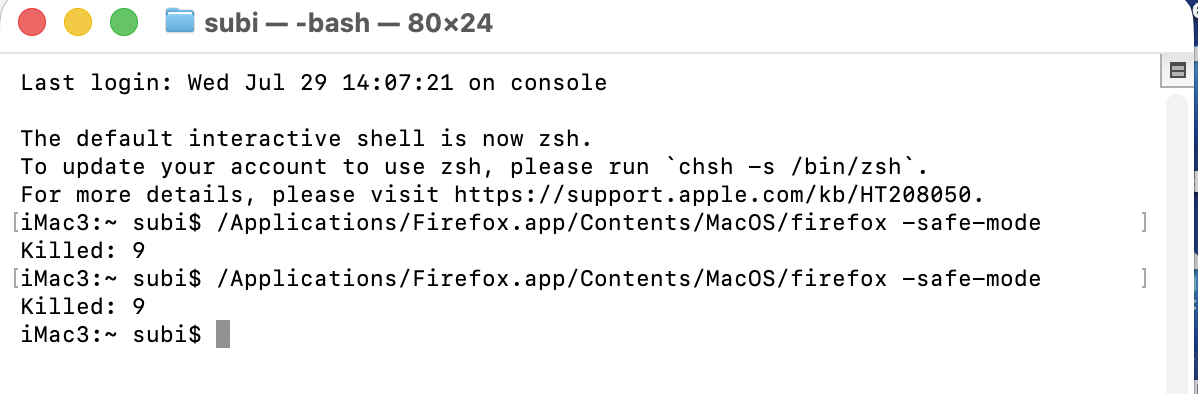
This is equally puzzling as the conventional launch silent termination. This usually means the app is not trusted, or it's corrupted to the point of causing memory issues and such so it's terminated.
Could you try downloading the separate nightly.mozilla.org and see what happens if you launch that one? (The difference also is that it comes with its separate fresh profile, so it might work around other, potentially profile–related issues.)
Also, if that one starts up, it's possible it would be able submit your previous crash reports in case the damage was so severe to even prevent collecting & submitting them.
The Nightly launched and I was able to skip around to various URLs. I haven't tried to sign in or create/synch a profile. Didn't want to mess it up. Just what do I need to do from here (e.g. submit prior crash reports, if any)?
OK so that means running a/some binary is fine and a fresh profile also works. Now let's try to launch your normal release, but with trying to create a fresh profile on the side. Does at least the profile manager launch?
/Applications/Firefox.app/Contents/MacOS/firefox -ProfileManager
which would start to support.mozilla.org/en-US/kb/profile-manager-create-remove-switch-firefox-profiles#w_start-the-profile-manager-when-firefox-is-closed that would allow to either select the current profile and try to launch that one; or if that fails, creating a new "testing" profile and launching that, to see if clean slate works.
In case you're not able to even launch the profile manager from terminal, creating and launching a profile can be done by:
/Applications/Firefox.app/Contents/MacOS/firefox -CreateProfile fresh
followed by:
/Applications/Firefox.app/Contents/MacOS/firefox -P "fresh"
to see if this can launch.