


Where Do Sent, Draft, Deleted, etcetera Go?

PRELUDE: I have several email accounts. All accounts display properly, except one. Yes, this is similar to my question about bottom of the far left [of emails] list of emails - but this is different.
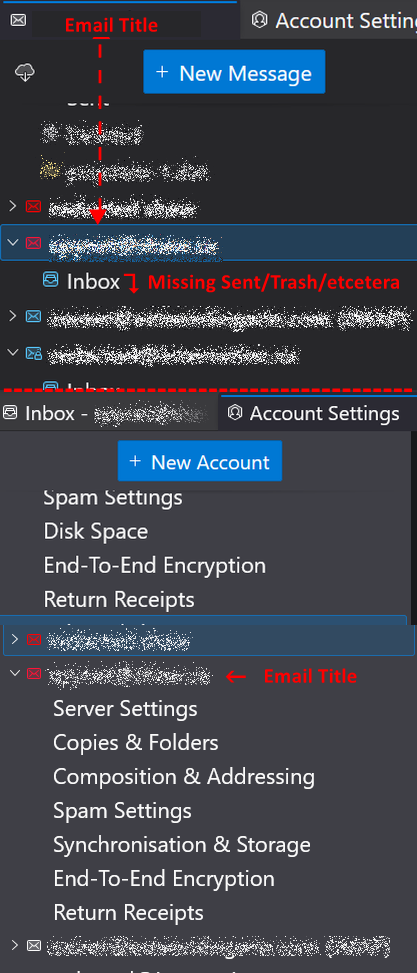
On the far left of Thunderbird is a list of all my email accounts with "Inbox" etcetera. Each email account shows it's Inbox/Sent/Deleted/ except for 1 account. The problem email account only shows it's Title and Inbox northing else. Yes, I tested it and sent emails to it, and used the problem email account to send, create a draft, and they don't show..
The image explains it.
Thanks for reading this ~r
All Replies (8)
Just a guess,.... It is a pop account. They only have an inbox, until other folders are required from your activity like sending mail etc.
@Matt
Yes, I suspected that but as I said: "I tested it and sent emails to it, and used the problem email account to send, create a draft, and they don't show.."
Of note is that I used both the problem account to send, then a outside email account (one that is not associated with ISP), to problem email I used different email account with same ISP and nothing changed - good or bad.
Sorry, I don't see what the image you provide means. ~r
redacted said
Sorry, I don't see what the image you provide means. ~r
Unrelated junk that was pending posting on another topic. This forum does some odd things with images if you have more than one tab open at a time.
@Matt said: OK. Can you please tell me how I might fix the problem in OP?
Pop accounts. Sent, Drafts etc are not created as folders until you create and send an email from that pop account.
Imap accounts You need to subscribe to see folders. In Folder Pane
- Right click on the account name and select 'Subscribe'
- select all required folders and click on OK
re : Account showing only Inbox.
I notice the account with only Inbox has a red icon with no padlock - so it looks like it's not using secure server settings.
In 'Account Settings' for the problem account
I'm not sure which is the problem account based on your image as the imap account shows info, but the one highlighted - blue - is collapsed. It might help if a portion of the account name was revealed so we know which is which. Please post useful images as described below. I've explained why we need the info.
In left pane is the name of the account and it will have a > chevron on the left of account name. click on that chevron to reveal all the option. When you post an image, the contents displaying below the name help to identify whether you have a Pop or Imap account.
Select 'Server Settings' for problem account Post image showing the all data on the right side. Just obscure the first part of email address, but nothing else. This will tell us what Server Type is set up for the account. Don't worry about server names because they are general very generic and used by thousands of people. Then click on 'Advanced' button - post an image showing what is selected. That will tell whether the account is set up as a deferred account using eg: Local Folders or whether it's set up to use it's own set of folders.
Select 'Copies & Folders' Post image showing the all data on the right side. Just obscure the first part of email address, but nothing else. This will tell whether all is set up correctly. If there are more secure settings available then we can advise.
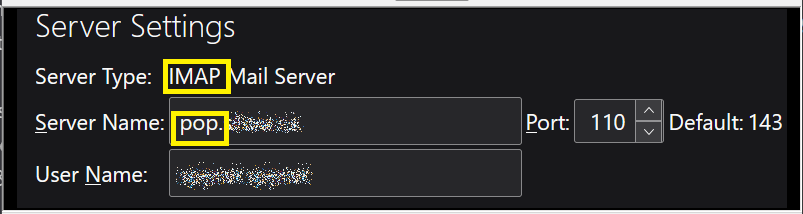
Thank you for all of that I read the steps you requested but before I started, I went "Duh" because I saw Type was set as IMAP and Server type is set to POP
Settings for problem child are: Server type: IMAP Mail Server Server Name: pop.ISP.ca See image.
I will wager your next weeks pay that I have to change IMAP Mail Server to POP Mail Server. Am I right?
So sorry. I should have seen that a long time ago.
Correct me if I'm wrong, but is the only way to fix it is to delete the account, and then set it up again as --->
- Server Type: IMAP Mail Server to
- Server Type: POP Mail Server? (assuming I want POP)
Or, is there a file that can be edited to set IMAP to POP in the server "Type"?
Finally, I apologize for not seeing this before, and for wasting your and other's valuable time.
~r
redacted மூலமாக திருத்தப்பட்டது
re :I will wager your next weeks pay that I have to change IMAP Mail Server to POP Mail Server. Am I right?
You are right if you want to use a Pop account. It would mean creating the account as new. But if you want to use Imap then you just alter the server settings.
You have created an Imap server type for that mail account, so would have to use imap server settings. You do not have to delete the account if you want to use it as an imap account. You would just need to alter the server settings.
If you had shown me the current server setting then I could have told you the correct imap settings. I'm going to guess it might be shaw / rogers.
Imap :
- Incoming Mail Server: imap.shaw.ca
- Port: 993
- Connection Security: SSL/TLS
- Authentication Method: Normal Password
- Username: Shaw email address without the @shaw.ca
SMTP
- Outgoing Mail Server: mail.shaw.ca
- Outgoing Port: 587
- Connection Security: STARTTLS
- Authentication Method: Normal Password
- Username: Shaw email address without the @shaw.ca
Most servers ask for user name = full email address, but it's possible if you use shaw then they may insist Username is the bit before the @.
If you do not want Imap then you would have to delete the Imap account and create a new account. Menu app > New account > Email Enter requested information Please note Thunderbird tends to auto search for the IMAP settings, so you would need to manually alter the Protocol to use POP and then pop settings get selected.
But these are the Pop server settings for shaw. POP
- Incoming Server: pop.shaw.ca
- Port: 995
- Security Type: SSL/TLS
- Authentication Method: Normal Password
- Username: Shaw email address without the @shaw.ca
Toad-Hall மூலமாக திருத்தப்பட்டது
@Toad-Hall RE: Please note Thunderbird tends to auto search for the IMAP settings, so you would need to manually alter the Protocol to use POP and then pop settings get selected.
Great. That's all I need to move forward now. As for settings - I had those. As for providing the information you knew you needed, I have only been using Tbird since it was Mozilla Mail. and Newsgroups in 1998. and tho I have experience in using it, I don't orbit Tbird. I'd love to know what you do. I apologize for not providing more data. I will try to be more accurate if I have other problems I can't fix myself or with AI.
Thanks very much for time, ~r