


Task Mgr shows multiple FF open after installing Privacy Badger

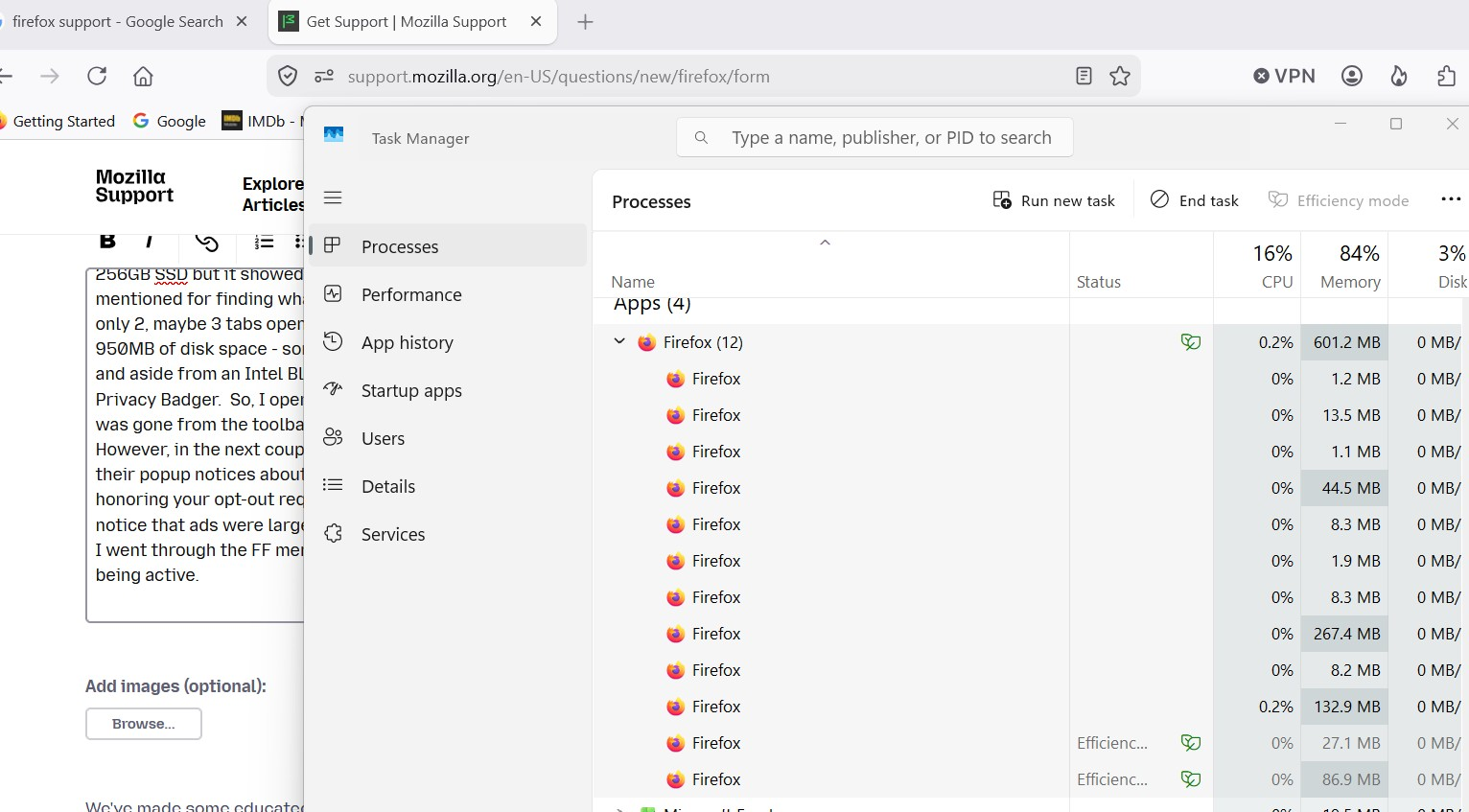
I am currently using a ~6 yr old laptop with a 256GB SSD running Win11, v25H.2, build 26200.8457. My Firefox is 151.0.1 64bit. After a Firefox update a couple months ago, Privacy Badger was put forth as a recommended extension for FF and since it was showing on the toolbar I installed/activated it. It worked fine for maybe 2-3 weeks, then I started getting popups from Dell saying "can't do system backup, not enough memory", so I looked and I have a 256GB SSD but it showed I had <4GB free/available when every time I had checked it in the past, on at least a monthly basis, it was always around 65GB free. After doing a lot of web searching, one of the things mentioned for finding what was eating my memory was to check Task Manager, so I did. I generally have only 2, maybe 3 FF tabs open at a time but Task Mgr was usually showing up to 23 open and that FF was using about 950MB of disk space - something that I'd never seen before. I looked back at what updates were done and aside from an Intel Bluetooth update, the only thing that was different was that I had activated Privacy Badger. So, I opened FF, clicked on P-B, then 'uninstall', closed and restarted FF and the P-B icon was gone from the toolbar. However, in the next couple weeks, I noticed that when I looked at certain websites, I was still getting their popup notices about "please disable your ad-blocker so we can make money off the ads" or "we're honoring your opt-out request", or other. But, this didn't happen all the time, just sporadically, but I did notice that ads were largely gone from the websites I usually go looking at. I even went so far as to go to FF menu and check "use standard tracking protection", "never remember history", and didn't activate VPN or anything else. I went through the FF menus 'settings', 'extensions', 'more tools' and could not find any reference to P-B being active. However, FF still seems to be going a bit nuts about opening instances - I've uploaded an image of what Task Mgr is seeing as I type this out - in the background is my open FF showing 2 tabs open, but in the foreground Task Mgr is showing I have 12 open 'instances' taking up >600MB. About 10 days ago, I went through some of the FF help questions on the site and followed through with making sure this was clicked and that was unclicked and so forth, even went so far as to 'refresh' FF. Nothing has changed for the better, as a matter of fact now practically all websites I visit are asking me "do you want to disable your ad-blocker?". How do I answer that? I UNINSTALLED THE AD-BLOCKER!!!
Also, when researching where my disk storage disappeared to, I installed WinDirStat. Running that, I found capabilityaccessmanager.db-wal file was over 80GB which was way over what it should be. I found some steps to get rid of it and did so, but then found that my laptop now takes 5-6 minutes to start up (with an SSD???) where it used to start in ~45 seconds, and my wifi connection sometimes takes another 2-3 minutes to connect on top of the startup cycle. Looking at what capability....-wal does and it supposedly keeps track of or monitors or something with internet connections... And in the last two weeks or so, that db-wal file has gone again from ~26GB to almost 70GB and my free disk space is back down to about 6GB. So here's a theory: somehow Privacy Badger made some kind of change to Firefox, something hidden below all the surface commands and options, and that change is making FF keep all tabs/windows that are opened in that session in the back seat as it were until FF is closed. In the meantime, since FF has all these tabs/windows/sites still in memory waiting to be activated again and sucking up memory, CapabilityAccessManager is trying to also keep these in active memory but it doesn't delete those instances/websites when FF is closed because the last it heard from FF was 'keep these active in case we re-open them'.
But, that is secondary to the initial problem of "I uninstalled Privacy Badger but Firefox still acts like it is active", and "Firefox is using a lot of disk space that it looks like it doesn't actually need". I contacted Privacy Badger (extension-devs@eff.org) and ran through the situation with FF appearing to be still honoring P-B even though P-B was uninstalled and they said "Once you remove a browser extension from the browser, the extension should be fully gone. You may have changed various Firefox privacy settings or installed another blocker extension. You may have a VPN or some other software that blocks trackers." But that's just it, I have a separate VPN but it's ad-blocker has never been activated, and I haven't changed any FF privacy settings other than 'never remember history'...
Any words of wisdom on why FireFox still thinks Privacy Badger is still active would be greatly appreciated.
All Replies (2)
Hello,
This is not a problem in most cases,But if a specific process is taking up a lot of memory, it is most likely caused by the "privacy badger"s heavy tracking, which can cause excessive data caching. For the ad blocker popup still happening, make sure that you don't have any other adblocking extensions. You can try finding a better adblocking extension, or restarting your computer. I believe that it can be caused by the cache holding the data, and it may take some time to update.
For the capabilityaccessmanager.db-wal problem, do this : First, press win+R, type C:\ProgramData\Microsoft\Windows\CapabilityAccessManager, and press enter. Then, delete the CapabilityAccessManager.db-wal file, or delete the CapabilityAccessManager folder for a clean reset. Then, go to Admin command prompt and type net start camsvc to restart the process.
As mentioned in my original note, I have no ad blockers in use. I never had nor used an ad-blocker before P-B and thought that perhaps if Firefox was recommending P-B, then I might at least try it out. After this experience, I will almost certainly never use an ad-blocker again.
It may be coincidental, but my experience with compooters over the years has shown me that "if it can go wrong, it most certainly will and in a really big way". As I say, it may entirely be coincidental that within 10-14 days of installing/activating Privacy Badger, things started going south quickly and all this is the result of updating a bluetooth driver, but then again...
I have restarted my computer many times directly after using Firefox, I have refreshed Firefox, I now routinely use disk cleanup/cleanup system files, I also have used various dism.exe and sfc /scannow commands in a command prompt to check/clean up damaged system files and every time I restart my computer, it still takes 5-6 minutes to fire up and after viewing 6, 8, 10 webpages Firefox is still out there showing 10, 15, 20 or more 'instances' in Task Manager and using anywhere from 600MB to 1.2GB of disk space. I'm now having trouble wirelessly connecting to my printer, most likely due to the low disk space. In other words, nothing I have done and no steps I have taken (often on the advice of experts) has made one bit of difference - nothing has changed and actually, as a result of 'refreshing' Firefox, it actually regressed a couple steps.