


New Security Codes for vodafonemail.de, TLS Code not in Thunderbird available

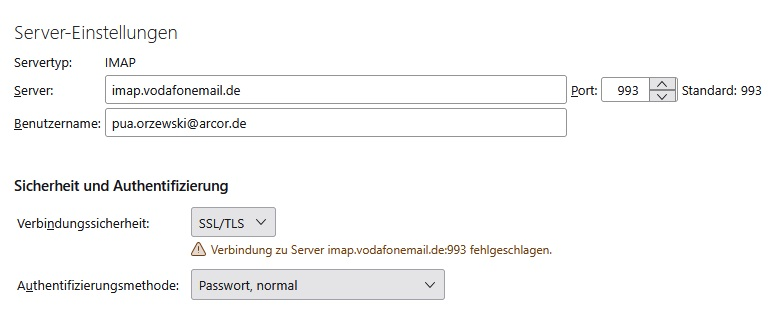
Server Posteingang IMAP (empfohlen) imap.vodafonemail.de Ports für Posteingang IMAP SSL: 993 / TLS: 143
Server Postausgang SMTP smtp.vodafonemail.de Ports für Postausgang SSL: 465 / TLS: 25 oder 587
தீர்வு தேர்ந்தெடுக்கப்பட்டது
I think Vodafone has changed some thing 6 Days ago, before it work for yaers without issue. The connection time is 5 minutes, but the sever replay before timeout. I use only Microsoft Software for anti-virus, I use my home PC. Thanks for your help, i will look on the Vodafone homepage if they explain something
Read this answer in context 👍 0All Replies (5)

New Security Codes for vodafonemail.de, TLS Code not in Thunderbird available
May be you can explain in more detail what you're talking about.
Thunderbird does not distinguish between SSL and TLS for 'Connection security'. The SSL/TLS setting is used for both, SSL, and TLS. In reality, no decent email client, including Thunderbird, is using the outdated SSL protocol anymore, but it's successor, which is TLS. Port 993 is defined for SSL/TLS IMAP connections, while Port 143 is used for clear text IMAP, i.e. without any SSL or TLS encryption. Why Vodafone suggest to use that port for TLS remains their secret.
As per your screenshot the settings for the incoming server are already correct.
Do you get any error message when attempting to retrieve messages from the server?
What is your anti-virus software?
Are you using a VPN or a proxy to connect to the Internet? Are you trying to connect from a corporate environment?
தீர்வு தேர்ந்தெடுக்கப்பட்டது
I think Vodafone has changed some thing 6 Days ago, before it work for yaers without issue. The connection time is 5 minutes, but the sever replay before timeout. I use only Microsoft Software for anti-virus, I use my home PC. Thanks for your help, i will look on the Vodafone homepage if they explain something
There appear to be ongoing problems with vodafonemail.de: https://status.vodafonemail.de/posts/dashboard