


How to transfer my thunderbird email with all folders to another computer after computer with email folders won't boot up

I have removed the drive from the computer that will not boot up. I hope to be able to transfer my "profile" to my new computer from that drive. I understand that I will need to have the same version of Thunderbird installed on my new computer in order to transfer my "profile". Since I can't access Thunderbird on my "crashed" computer, how can I know what version I had installed previously? How do I find where to load that version on my new computer?
All Replies (8)
install the current version from https://www.thunderbird.net/en-US/thunderbird/all/ note there are two versions: the ESR (ver 140) gets major updates annually, and the release version (150), which gets updates of new features monthly.
- install the new thunderbird, start once, and exit.
- enter %appdata% in search window on task bar and press Enter key
- this should open windows file explorer in Appdata\roaming folder
- highlight the Thunderbird folder and DELETE it
- paste your appdata\roaming\thunderbird folder from old PC here to replace it.
# start thunderbird and all should be there
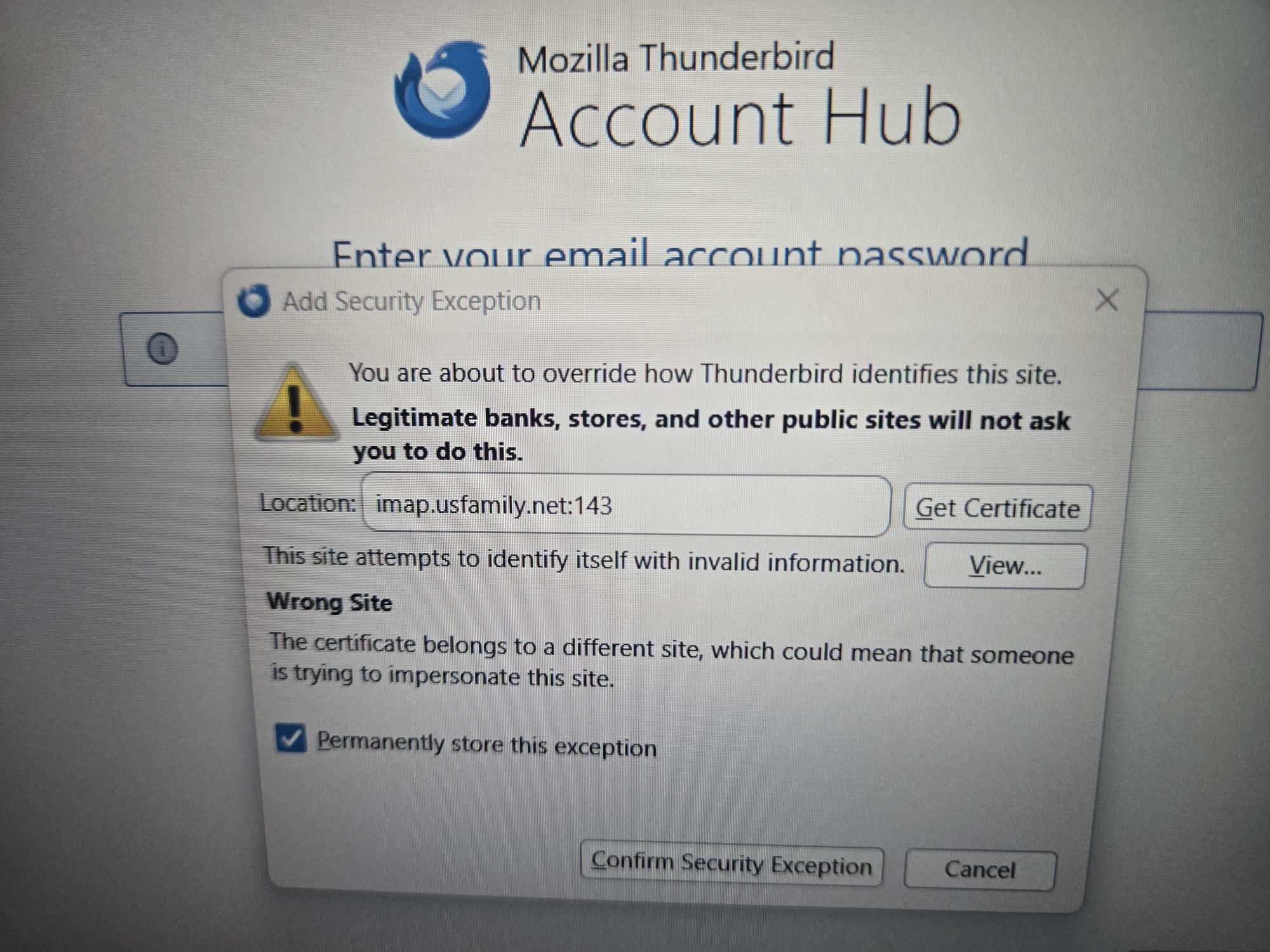
We are loading Thunderbird and see the warning below in the Add Security Exception section. A rather daunting message. How should we proceed.
Are you able to call?
(PII redacted by moderator)
No, we cannot call you.
Ed மூலமாக திருத்தப்பட்டது
gilbertson4 said
We are loading Thunderbird and see the warning below in the Add Security Exception section. A rather daunting message. How should we proceed.
Congratulations you have an antivirus product "helping" you with your security. Or at least that is the cause of about 99.9% of such topics here. Simply disabling it or allowing the use of the self signed certifiate after reviewing it in the view button to ensiure the source is the antivirus product. Such a message comes up only when the connection security is set to other than none and port 143 as you are displaying is a port that usually does not support encryption. So there does appear to be underlying issues with the details used to configure the account as well. But there appears to be odd issues with your email address and who is actually providing it.
I did try and lookup the correct settings to use for that provider. I got this, which indicates they have not updated their support pages in the last 20 years. https://usfamily.net/emailsetup.html
Then I stumbled onto the fact that the service is apparently now with savemyservice https://savemyservice.com/velocity/ and you pay an annual fee to them for the service
That lead me to these setting https://savemyservice.com/velocity-email/?faqs=migration-mailclients#brx-faq-velocity
📧 Incoming Mail Settings (IMAP)
   Server: mail.usgo.net
   Encryption: TLS (Port 143) or SSL (Port 993)
   Username: Your full email address
   Password: Your email account password
📩 Incoming Mail Settings (POP3)
   Server: mail.usgo.net
   Encryption: SSL (Port 995)
   Username: Your full email address
   Password: Your email account password
📤 Outgoing Mail Settings (SMTP)
   Server: mail.usgo.net
   Encryption: TLS (Port 587) or SSL (Port 465)
   Username: Your full email address
   Password: Your email account password
Unfortunately I have no idea when any of this occurred. None of the pages offer any sort of date information, but as a customer you might have some idea about that. But I doubt the server name being used is correct.
We are now at the stage to enter appdata stuff. We will follow directions to DELETE and we are then supposed to past appdata stuff from old PC to replace what we deleted. Since first computer crashed, we can't get it from computer. We loaded all email folders onto flash drive. When we plug in flash drive, we see emails. Will we be able to pull appdata folder from there? We have not tried yet as I don't want to risk without asking, Thanks.
OK, my misunderstanding. When you stated you had removed the drive from old PC, I inferred that you were able to access the contents of the drive. If you could post a screenshot of what you have, that will be a big help. Thank you
This email folder is on my husband's pc. The screen shot shows most of the folders I am missing. The drive from the "crashed" pc does not work. These folders look to be last updated in 2024. I know they have been updated since then, so I don't know where the 2025 and 2026 emails are. Do you have an idea? I would still like able to access the ones in this email folder as well. I moved this email folder to my new pc and need help getting them on the Thunderbird server. Any help would be greatly appreciated. If there is any way we can talk through some of this over the phone, please let me know. 612-719-9659. Thank you.
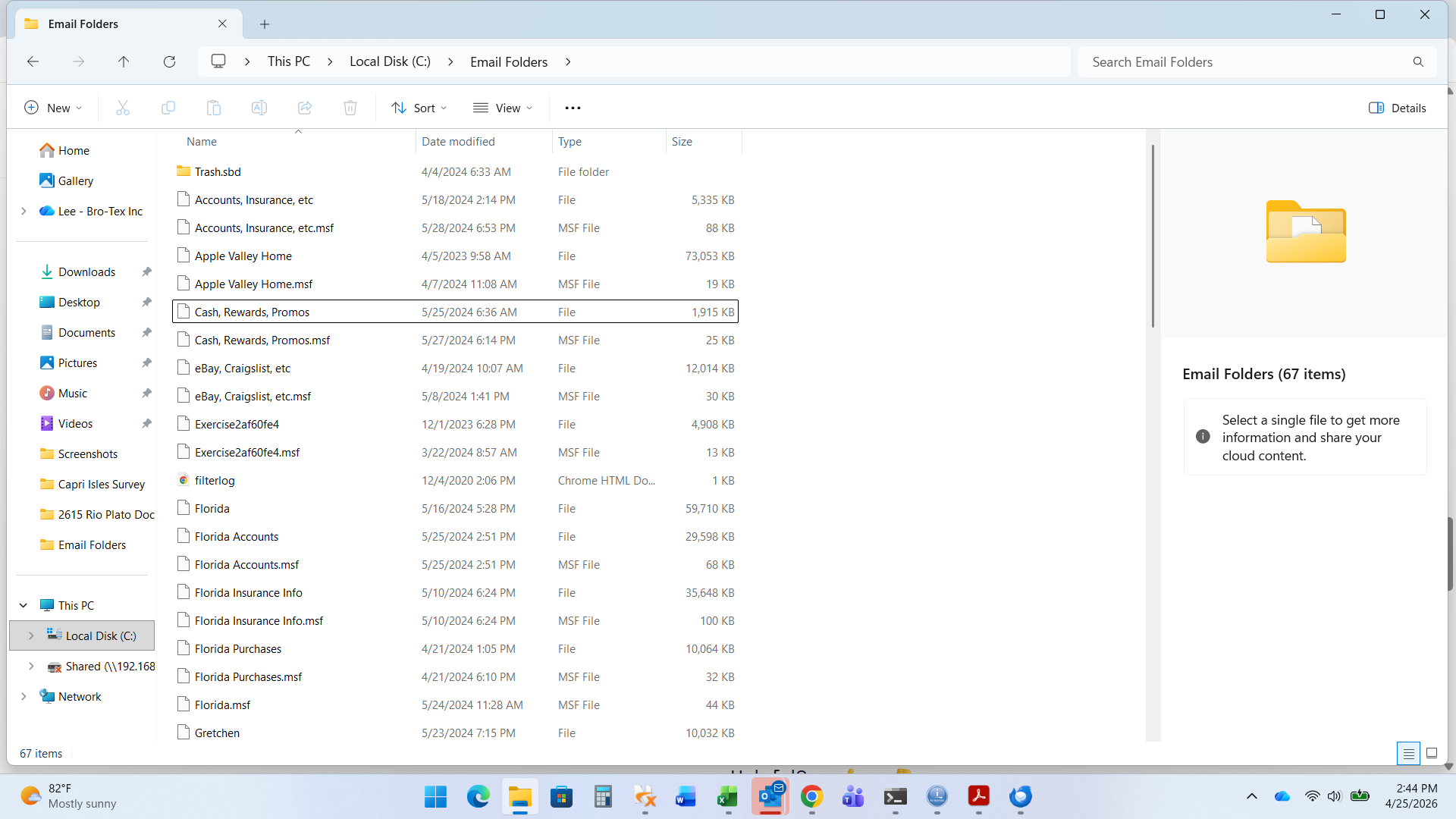
You can get these into thunderbird these steps:
- be sure that thunderbird is not running
- copy those files (withouth the msf twins) to the profile into the Mail\Local Folders folder
- restart thunderbird and they should be there.
BUT FIRST, in case you don't know where profile folder is, do this:
- click help>troubleshootinginformation
- scroll to 'profile folder' and click 'open folder'
- you are now in the profile, click the Mail folder and then the Local Folders folder
- THIS is where you want to copy those files to.
This post preempts my earlier suggestion where I inferred you had a full profile. It seems you are assembling pieces from it.
david மூலமாக திருத்தப்பட்டது