


How to get rid of Caldav- und cardav authentication demand?

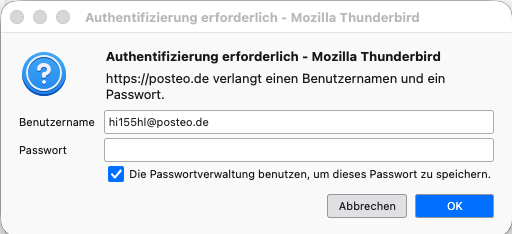
Thunderbird (actual version) is demanding constantly for caldav- and carddav authentications although the two mail accounts are deleted in Thunderbird. How can I get rid of these annoying messages?
All Replies (16)
Try looking at addressbook pane and see if you have a caldav addressbook. Remove it and the prompt should go away.
Thank for answering. Unfortunately no addressbook in the "contact2 panel (including address book in newer IOS versions I've been told). And when I open the Thunderbird's calendar preferences I get the message that all calendars are de-activated. Where to go now??
More information may help. I am unaware of IOS except on iphones. Maybe more explicit details will help.
There aren't a lot more informations I can give. The messages concerning caldav (2 accounts) and carddav (one account) started to appear some weeks ago. To get rid of it I deleted the accounts by Thunderbird's account preferences (and tranferred them to another mail provider). I also deleted the corresponding passwords but the messages still showing up when I start the MacMini (M4) and in between withour "pattern"., I suppose some problem with Thunderbird's "lightning". Additional remark: I am an ordinary user capable to solve most of common IT problems by studying internet's support websites but not this special one.
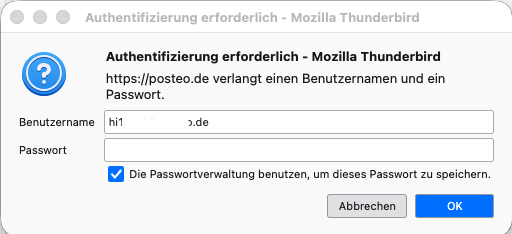
Your screenshot does not specifically mention caldav, so I'm wondering whether thunderbird might be trying to access posteo.de for some other reason -- eg to collect mail.
I receive three messages for two accounts (...posteo.de and ....web.de). Posteo demands only caldav authentifications, web caldav and carddav, All messages look similar - the only difference are the words caldav or carddav. And all messages refer to Thunderbird although I don't use Thunderbird any more to collect mails from these accounts. As told I deleted them to get rid of the messages - without success. I would install Thunderbird newly but it serves still for other accounts - without asking for authentifications.
hello there
Could you please provide more details about the issue? What steps have you already taken to resolve it? We recommend reinstalling the application if to many fixes were there. If you have tried any other steps, please let us know.
hello there
It seems that even after removing an account, Thunderbird may keep old configuration data and saved credentials. Deleting these manually might resolve the issue without needing a full reinstallation. Please follow these steps: Open Thunderbird Settings. Go to Privacy & Security. Scroll down to Passwords and click Saved Passwords. Click Show Passwords. Search for "posteo" and "web.de". If you find any related entries, delete them. Thunderbird often stores authentication data in a separate secure vault, which is why these settings can remain even after an account is deleted.
hello there
taking the deepclean
via config.editor
Deep cleaning via the Config Editor Open Thunderbird and go to Settings. On the General tab, scroll all the way to the bottom and click the Config Editor button. In the search bar at the top, type: calendar.registry You will see a list of rows. Look for entries containing posteo.de or web.de and click the trash/delete icon next to them. Next, clear the search bar and type: print_printer If you see any entries related to your old account, delete or reset those as well. Restart Thunderbird.
This does not work on mobile devices because the text and data are different from the desktop version.
mobile devices Most of these subjects focus on cleaning parts of the software that could become too full of data. ios Primary Fix: The problem is almost always located in Settings > Mail > Accounts. Locate the old account and select Delete Account.
Googlethunderbird. மூலமாக திருத்தப்பட்டது
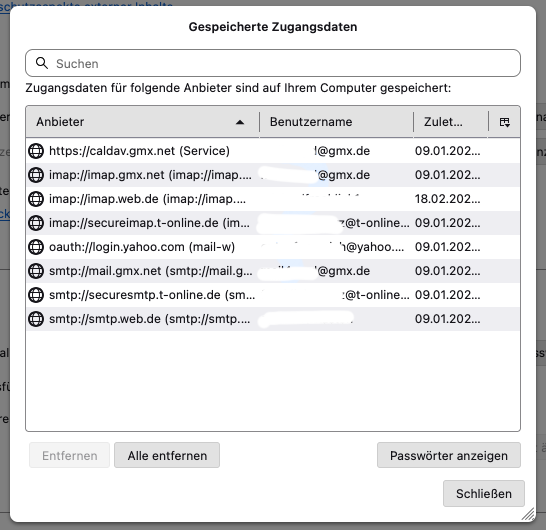
Thanks to everybody who tries to help. As written I deleted the accounts in Thunderbird, and I deleted the passwords in Thunderbird preferences>Saved passwords as well. Except the smtp.web password listed in the screenshot but now it is deleted , too. No posteo.de in the list but it still demands for authenification. Concerning deepclean via config,editor a - maybe - silly question: Doesn't it belong to Windows, or does Apple's IOS has also one? I tried it with "Terminal" but it tells that config.editor doesn't exist. Additional information: To delete the web smtp password didn't change anything - the authenification demand still appears.
Thanks for hanging in there.
I might have an idea but won't get to it for a couple hours, so please don't go the nuclear route yet.
I will be patient - because tomorrow I'm going away and the MacMini will stay at home. Please don’t be surprised if I don’t post any updates on my progress – or lack thereof – over the next three weeks. I wonder if there will be a solution when I'm back end of April. Thanks to all who try to find it!
Is this still an accurate summary? Caldav and (or) cardav authentication prompts related to https://posteo.de
Make sure you don't have multiple prefs.js files.
Did you ever previously use postbox or betterbird?
SUMO indicates you are on macOS 10.15. Is that correct?
Do you have the same issue on a different newer device?
I wouldn't trust calendars that are deactivated.
- backup your prefs.js
- look in for prefs.js for all lines with oauth2.scope and make sure none reference calendar
And if you don't have any local calendars that you need to save - clean house as follows, then add back any calendars that you need:
- delete everything in prefs.js with lines user_pref("calendar.
- delete calendar-data directory from the thunderbird profile
Hi, once more, I'll try to answer all questions: the problem still exists in posteo.de (caldav) and web.de (caldav+carddav). prefs.js? Mac's Terminal doesn't find, Do they exist in Apple's IOS, If yes: Where? I never used postbox and betterbird. SUMO isn't up-to-date. I'm on MacOS Tahoe (26.4). It's only my newest Apple device on which Thunderbird asks for these authenifications. When I go to Thunderbird's calendar preferences I've been told that all calendars ar deactivated (Screenshot attached). You see: I'm still at a loss.

> I wouldn't trust calendars that are deactivated.
Sorry, what I mean is that I don't trust that deactivating calendars will prevent you from having a problem. Therefore, my suggestion to remove all traces of calendar information.
prefs.js is found in your Thunderbird profile https://support.mozilla.org/kb/profiles-where-thunderbird-stores-user-data