Unable to delete message header in the Message List Header pane

I have Thunderbird version 149.0.1 installed and set up to display the Classic View, showing the Folder pane, Message List Header pane, and the Message pane. I have two accounts - my email account and Local Folders. All my email is routed to the Local Folders for storage on the PC. I have a number of messages in the Local Folders Inbox, and the headers show in the Message List Header pane. This message header is marked as read, and as spam, but I can not do anything with it. I can not change the status (either to unread, or not span), nor can I delete it. The actual message appears to have been deleted - if I select the header, the Message pane is either blank, or displays the message previously selected. If I open the message a new tab, the contents are blank, and if I select View Message Source, that window is empty (blank). I have restarted Thunderbird several, once in Windows safe mode, and that header remains. I can read all the other messages in the Inbox, change their status, or delete them. The attached image shows the shows the message in question as selected.
How do I delete that (@#$I*@%#@$%) message header? Thanks to anyone who can help!

தீர்வு தேர்ந்தெடுக்கப்பட்டது
- Right click on the 'Inbox' and select 'Properties'
- click on 'Repair Folder'
- click on 'OK'
re : I have two accounts - my email account and Local Folders. Is you 'email account' set up as pop or imap ?
re :All my email is routed to the Local Folders for storage on the PC. Describe exactly how you have this set up. Are you using a Message Filter to auto move or copy all emails downloaded to mail account? if yes - Please post an image of that Message Filter.
Read this answer in context 👍 0All Replies (4)
It is just the message list and you have stared the message in it. There is also probably a setting in account setting that says not to delete starred messages. There usually is. So click the star so the message is not starred any longer and then delete it as normal.
Thanks for the reply, Matt. But that did not do the trick. I unstarred the message, and still can not delete the message. You're right about a setting to keep starred messages; in fact there are two places where that setting is invoked. But unticking those boxes made no difference.
தீர்வு தேர்ந்தெடுக்கப்பட்டது
- Right click on the 'Inbox' and select 'Properties'
- click on 'Repair Folder'
- click on 'OK'
re : I have two accounts - my email account and Local Folders. Is you 'email account' set up as pop or imap ?
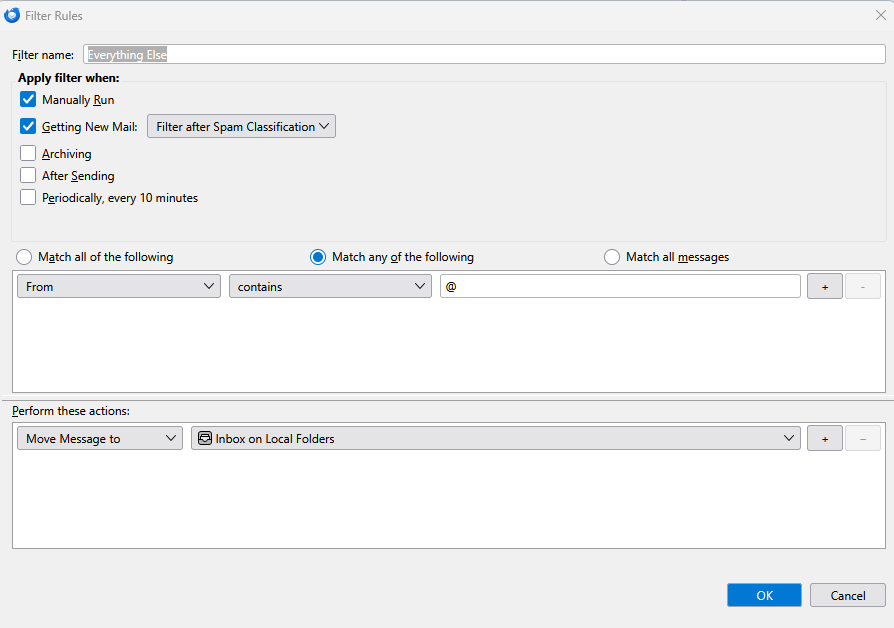
re :All my email is routed to the Local Folders for storage on the PC. Describe exactly how you have this set up. Are you using a Message Filter to auto move or copy all emails downloaded to mail account? if yes - Please post an image of that Message Filter.
Thanks for the reply, Todd! That was the solution. And, yes ... I use filters to move messages from my email account folder to my Local Folders. Attached is a copy of that filter. It's the last filter in the list; Thunderbird tells me that my filters are processed in the order they are listed. So this filter processes everything that is left after the other filters run, a catch-all if you will!