


Why Do I Have Dual Drafts Folders

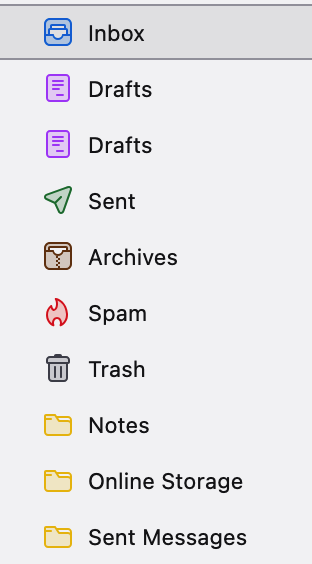
I've included a screenshot, question is why two Drafts folders?
All Replies (6)
The developers have been meddling. Right click the folder, select properties and see what the folder is really called. Perhaps then we can find some sort of workaround.
Both folders are called "Drafts" and both are linked to my account: imap://htlausch%40yahoo.com@imap.mail.yahoo.com/Drafts
Also, I'm on Thunderbird 148.0.1. And the two Drafts folders appear on both my Apple systems, an M1 2020 MacBook Pro, and my 2018 Intel Mac Mini. Hope that information may possibly provide a clue. Both systems are running Sonoma 14.8.3.
right click on the account in the folder pane select subscribe from the list and unsubscribe from the Drafts and see if both go. If they do repeat and ad it again.
If they do notb disappear on unsubscribing I will have to ponder it. The cause is not obvious. So let me know how it goes.
No matter what I did, I still ended up with the same two Drafts folders. And, I tried many, many times. I've included a screenshot of the folders when you select the account and click on subscribe, and in those folders there is only one Drafts folder.
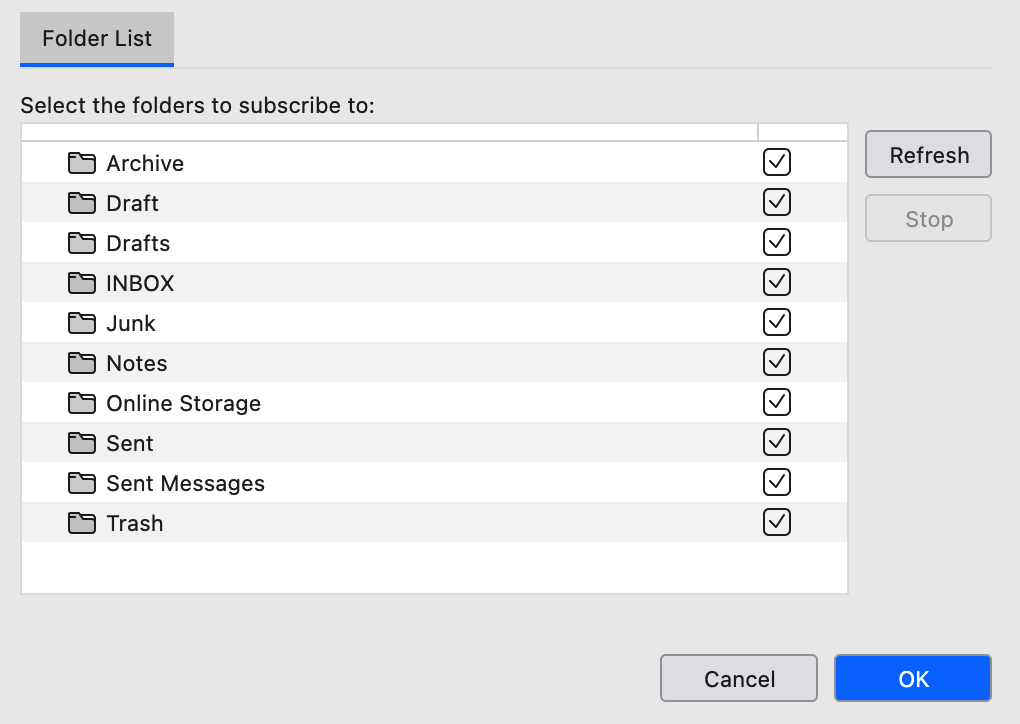
What happens when you deselect the "Draft" or the "Drafts" folder in the folder list?