


Online shopping in UK fails with access denied

For clarity, I am based in the UK trying to shop from the co-op supermarket which is based in the UK.
I am getting an access denied message with shop.coop.co.uk, but not with any other UK online shopping site.
I have tried all the usual suggestions like reboot, clear cache, remove proxy, and I do not have VPN.
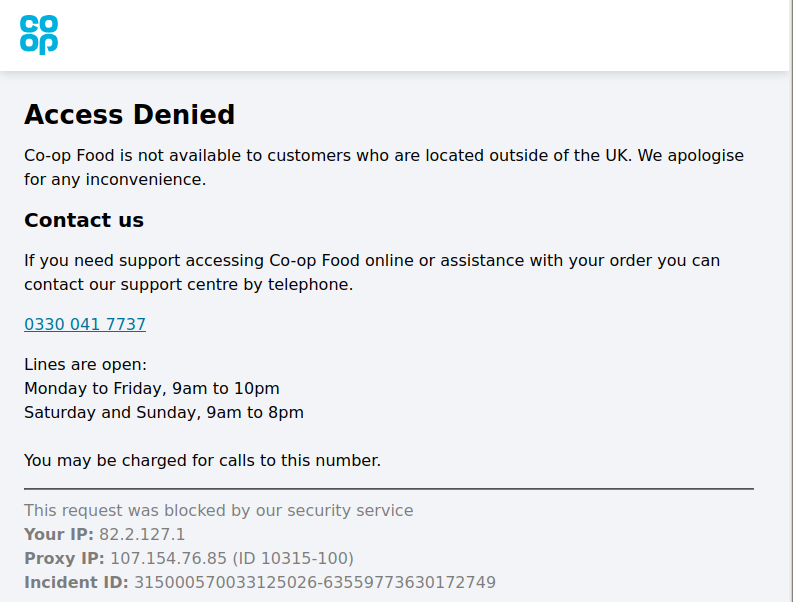
I have downloaded the html of the message, and taken a screenshot of it as shown below. Looking into the html, there are references to Incapsula, which may suggest where the problem lies?
This problem started when I had to change my Virgin Media hub from Super Hub 2 to Hub 4 around July last year.
One suggestion that is often made is to delete cookies. However it is not clear which cookies may be relevant.
Any ideas on how to identify the source of this issue will be most welcome.
Geoff
Geoff மூலமாக திருத்தப்பட்டது
All Replies (6)
I get that error because I'm in the US, but you failed to mention if you're in the UK
Thank you jonzn4SUSE for your comment. I have edited the question, so I hope that is clear now. Please do let me know if any other information might be useful to include in the question.
Geoff said
For clarity, I am based in the UK trying to shop from the co-op supermarket which is based in the UK. This problem started when I had to change my Virgin Media hub from Super Hub 2 to Hub 4 around July last year.
Doesn't appear to be a browser issue to me. What happens in other browsers? Test by connecting your computer to your phones hotspot or some other public wifi and see what happens. Also see where you are using this. https://www.where-am-i.co/
jonzn4SUSE மூலமாக திருத்தப்பட்டது
Hi Geoff
Can you try that site again? I am UK based and it seems to open fine for me.
Do you have any add-ons installed in Firefox?
Thanks Paul for the stimulating question.
I have tried several times to connect to the site. I get the same message that I posted in my screenshot every time - the only item that changes is the long Incident Id number.
I have used dnschecker.org to examine the IP addresses given.
- Your IP: 82.2.127.1 is customerid.cable.virginm.net
- Proxy IP 107.154.76.85 (ID 10315-100) is 107.154.76.85.ip.incapdns.net
'customerid' is my shorthand for a string with several fields, which I think identifies my account on virgin media. The IP shown is not the IP on my machine. Regarding the proxy, A web search for Incapdns.net leads to www.imperva.com - a cybersecurity group.
The HTML of the web message shop.coop.co.uk, is very cryptic, but standout items are:
- <meta http-equiv="X-UA-Compatible" content="IE=edge,chrome=1">
- <style>:is([id*='google_ads_iframe'], several references to google-one-tap-THING) ... </style>
I mention this because I do not have chrome on my machine. Let me know if it would be useful for you to see the full HTML source - can I upload a file?
Finally to answer your question on add-ons, about:support produced 9 which are enabled. These seem mostly standard and here are a few that might be relevant:
- DuckDuckGo Privacy Essentials
- Web Compatibility Interventions
- Form Autofill
- Add-ons Search Detection
Please let me know if you need the whole list.
By the way, at the end of each post is a question "Did this reply solve your problem? " followed by an active field " Solved the problem". I have not clicked that so far as I did not want to mark the problem as solved.
Hello jonzn4SUSE,
I did try www.where-am-i.co, it responded with "position unavailable". Incidentally, I also tried with iPad, and it gave an error message starting with " recurring problem .. "
My computer is a Linux desktop connected to the router via Ethernet, it does not have a wifi adapter.