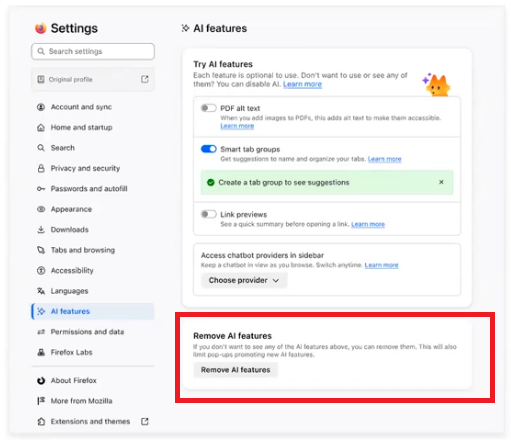
1 big button in settings "disable all AI"
Please make life easy for normal people and add a big button in the settings "disable all AI". It is a pain to go through all the settings looking to disable it (if that is even configurable -- the fact thatit comes enabled by default feels like it is actively undermining my trust in what has been the best and most trustworthy browser for *decades*).
I do not need AI, I do not want it, I have severe ethical and security concerns about it. If you are hell-bent on adding it anyway, please make it trivial to entirely opt out.
Please make life easy for normal people and add a big button in the settings "disable all AI". It is a pain to go through all the settings looking to disable it (if that is even configurable -- the fact thatit comes enabled by default feels like it is actively undermining my trust in what has been the best and most trustworthy browser for *decades*).
I do not need AI, I do not want it, I have severe ethical and security concerns about it. If you are hell-bent on adding it anyway, please make it trivial to entirely opt out.
All Replies (1)
"disable all AI"? I'm sure we can't do that. There will be "Remove AI features" and it's already decided. Sorry.