


Thunderbird 140 and win 11 will not work. Gives error "Thunderbird is already running".
Win 11 and Thunderbird 140 not working and I have tried all the things I found on the internet and none of them work. I have tried cleaning my registry and deleted directories and uninstalled thunderbird re-started and it will still not work.
I guess I have to forget thunderbird. It is a shame.
Wayne Mery மூலமாக திருத்தப்பட்டது
All Replies (14)
140 and win 11 work fine together You did not share any error messages or other information on your problem.
Well I can not show you any error messages as I have tried installing and using Thunderbird 5 times and getting the same error. thunderbird is shutting down another something is still running. This problem is all over the internet and I have tried all the solutions with no joy. You may want to say it works but I am telling you that it does not on my win 11 machine.
I have tried installing again and this is the same error and if you click the close thunderbird the error message keeps comming back and I have used cancel and that stops the error message some of the time or I use the task manager to stop the process. Here is your error message. I will be uninstalling and not going to try again.
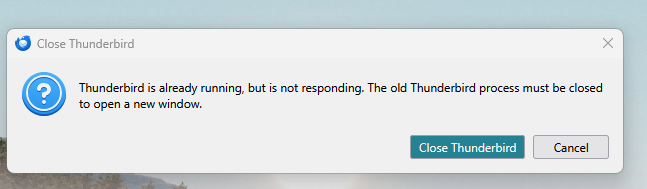

Do you have two installations of Thunderbird?
Can you make sure that Thunderbird is not set to open when your computer starts up, re-start Windows, and then open Thunderbird?
I already told you that I removed all directories and edited the Registry and removed all having thunderbird in them. I also restarted the computer and then I just tried to install and it gave me the error you saw. I have now removed all the thunderbird from my win 11 machine and use my Ubuntu machines. I am done with thunderbird on win 11.
The situation where you're advised that Thunderbird is still running usually happens if interrupted by an antivirus. If you were using an antivirus other than windows defender, that may have caused it. Bitdefender and Avast are notable offenders. That error condition can be resolved by rightclicking in task bar, clicking task manager and ending the remaining thunderbird task. The registry isn't used by thunderbird and reinstalls do not correct the issue, as the problem is external to thunderbird. I mention this, only as others may be reading this and want assistance. But I understand you've left.
Another possibility is the previous Thunderbird did not completely shut down.
I would reboot Windows, and try to start Thunderbird while holding down the shift key to start Thunderbird in Troubleshoot Mode.
If you get the same error, look for parent.lock file in the Thunderbird profile and delete it. https://support.mozilla.org/en-US/kb/profiles-where-thunderbird-stores-user-data#w_finding-your-profile-without-opening-thunderbird
p.s. did you install Thuderbird from the Microsoft Store?
Wayne, I was wondering also about installations from the different download sites (thunderbird.net and the Microsoft store) and if Drachir may have uninstalled everything from one installation location but not the other. Obviously, the error message indicates that something from Thunderbird is still running.
Drachir has made clear that they are not going to work on this problem anymore, so we are writing for other users.
Ok I have only one installation of Thunderbird and I have tried to uninstall and install and it is ver 146. This does not work and I tried the holding down the shift key when starting with no joy. I have also tried safe mode from the command line. Still no joy and have uninstalled again
Can we back up?
When you get this error what happens if you select to close Thunderbird and then try again?
If Thunderbird did not start. Open the Windows task manager when the error occurs. (Ctrl+Shift+Esc) Check in the applications and background processes fir Thunderbird is it shown anywhere? If it is right click the item in the list and select end task from the menu. Try again to start Thunderbird.
What I am trying to establish here is if the application in actually crashing and restarting to get the error message. It should not, but sometimes antivirus products in particular make the impossible happen when they interference.
But you appear to be using Linux. (per the forum software) Very relevant information to share when you seek support as Thunderbird comes in many flavors for Linux depending on your distribution and installation source so is your windows 11 some sort of dual boot.
just so you all know, I have removed every security and add ware removal software from my Win 11 computer and still no joy. Thunderbird still does not work on my machine with the same error message and I have uninstalled. I do not have two thunderbirds on my machine.
There are two rare issues which might happen, together or independently: 1. Thunderbird attempts to start twice on the same startup 2. Thunderbird on startup doesn't detected that there is already a running instance
> Open the Windows task manager when the error occurs. (Ctrl+Shift+Esc). Check in the applications and background processes fir Thunderbird, is it shown anywhere?
I'm not sure you have answered this question.
yes it does show up, both thunderbird and cancel thunderbird. I don't have it on my machine to reproduce it but when I start thunderbird both show up in the task mgr and if I stop one both stop. It will not allow me to start without the same error message so I have uninstalled. Too much time on this one. It is sad. I have thunderbird on all three of my Ubuntu machines and my android phone but no joy on win 11. I will just not get email on the damn Win 11 machine any I don't like it.