


Shrink vertical space between shortcut icons on new tab page

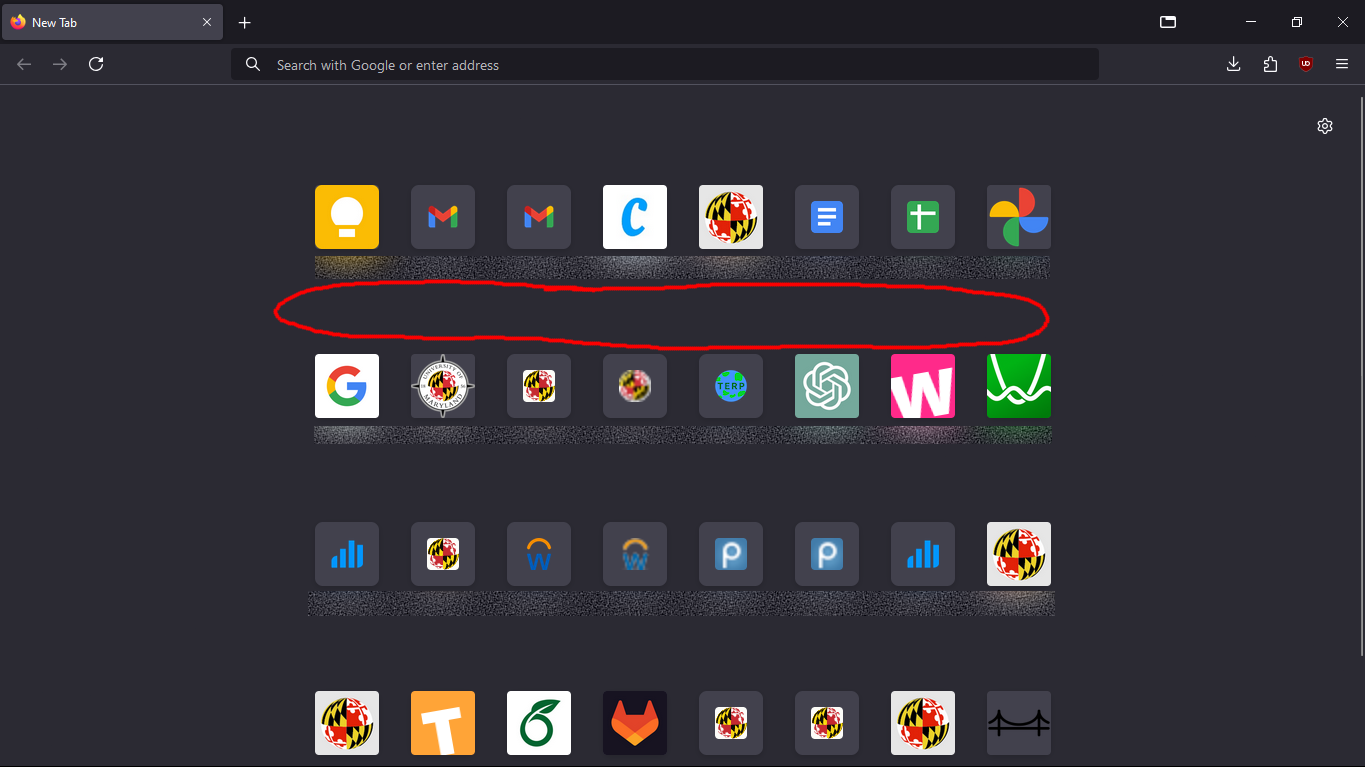
How to shrink this vertical space? (see attached image)
Ever since 131.0.0 my shortcut icons got all messed up so I am trying to restore the original look. I've already removed the giant Firefox logo and made my icons larger. Now I need to condense them so I don't have to scroll to see them all.
Here's what I have so far in my userContent.css:
/* Minimize the size of the logo and wordmark on the Home/New Tab pages */ @-moz-document url(about:newtab), url(about:home) {
 .logo {
   background-size: 0px !important;
   height: 0px !important;
   width: 0px !important;
 }
 .wordmark {
   background-size: 0px !important;
   height: 0px !important;
   width: 0px !important;
   margin-inline-start: 0px !important;
 }
 /* Expand the shortcut icon images to max size on the Home/New Tab pages */
 .top-site-outer .tile .icon-wrapper {height:100% !important; width:100% !important;}
}
How to shrink this vertical space? (see attached image)
Ever since 131.0.0 my shortcut icons got all messed up so I am trying to restore the original look. I've already removed the giant Firefox logo and made my icons larger. Now I need to condense them so I don't have to scroll to see them all.
Here's what I have so far in my userContent.css:
/* Minimize the size of the logo and wordmark on the Home/New Tab pages */
@-moz-document url(about:newtab), url(about:home) {
.logo {
background-size: 0px !important;
height: 0px !important;
width: 0px !important;
}
.wordmark {
background-size: 0px !important;
height: 0px !important;
width: 0px !important;
margin-inline-start: 0px !important;
}
/* Expand the shortcut icon images to max size on the Home/New Tab pages */
.top-site-outer .tile .icon-wrapper {height:100% !important; width:100% !important;}
}
தீர்வு தேர்ந்தெடுக்கப்பட்டது
This code might be better
@-moz-document
  url-prefix(about:newtab),
  url-prefix(about:home) {
   .top-site-outer .tile .icon-wrapper {
     height: 100% !important;
     width: 100% !important;
   }
   .top-site-outer .default-icon,
   .top-site-outer .search-topsite {
     background-size: 100% !important;
     height: 100% !important;
     width: 100% !important;
  }
  .top-site-outer .search-topsite {
     height: 20px !important;
     width: 20px !important;
  }

 .top-site-outer .top-site-inner > a {padding-block: 8px 0px !important}
 .top-site-outer {margin-block-end: 0px !important}
}
Read this answer in context 👍 1
All Replies (3)
Irreverent post made in error.
ThePillenwerfer மூலமாக திருத்தப்பட்டது
Note that there is a pref in about:config to show/hide the logo.
- browser.newtabpage.activity-stream.logowordmark.alwaysVisible
Try this CSS code in userContent.css.
.top-site-outer .top-site-inner > a {padding-block: 4px !important}
.top-site-outer {margin-block-end: 0px !important}
தீர்வு தேர்ந்தெடுக்கப்பட்டது
This code might be better
@-moz-document
  url-prefix(about:newtab),
  url-prefix(about:home) {
   .top-site-outer .tile .icon-wrapper {
     height: 100% !important;
     width: 100% !important;
   }
   .top-site-outer .default-icon,
   .top-site-outer .search-topsite {
     background-size: 100% !important;
     height: 100% !important;
     width: 100% !important;
  }
  .top-site-outer .search-topsite {
     height: 20px !important;
     width: 20px !important;
  }

 .top-site-outer .top-site-inner > a {padding-block: 8px 0px !important}
 .top-site-outer {margin-block-end: 0px !important}
}