

This thread was archived.
Please ask a new question if you need help.

Solved
Archived
Disactivate the ability to show an e-mail like has been read while being in the Incoming e-mails and moving up and down with the arrows or the mouse.

Moving with the arrows in the Incoming E-mails the green dot changes to grey and the e-mails appear like they have been read. So sometimes we miss to see e-mails. How could we disactivate this? Thanks!
Moving with the arrows in the Incoming E-mails the green dot changes to grey and the e-mails appear like they have been read. So sometimes we miss to see e-mails. How could we disactivate this? Thanks!
All Replies (2)
தீர்வு தேர்ந்தெடுக்கப்பட்டது
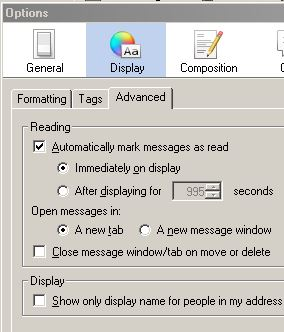
On the toolbar  > Options > Display > Advanced
set it to your liking.
If you uncheck "automaticly...." You need to mark every mail after you read them as read.
> Options > Display > Advanced
set it to your liking.
If you uncheck "automaticly...." You need to mark every mail after you read them as read.
EDIT should be ..... > Options > Options > .........
Gnospen மூலமாக திருத்தப்பட்டது
Thank you sooooo much!!!!!!!!!!!!!!!!!!!!!!