why did you disconnect me from firefox?
Lost ALL my passwords, asked for reconnect, nothing, why????????
Otvorené


Lost ALL my passwords, asked for reconnect, nothing, why????????
New computer with hi dpi video card and now font size on firefox bookmarks and toolbars is so small it is almost not readable
all my icons keep wanting to sign me in i lost all n y icon mey extensions are there are enabled enabled but not in toolbar ehat is going on firefox is screwe… (ďalšie informácie)
all my icons keep wanting to sign me in i lost all n y icon mey extensions are there are enabled
enabled but not in toolbar ehat is going on firefox is screwed p everytime i hit any icons i have to reload or reinstall please help
i need netmirror extension on firefox
I want to remove a VPN.
so i found a strange problem that when i connect headphones to my computer i have a very quiet sound on firefox videos (youtube an ect.). it is not a low volume on my com… (ďalšie informácie)
so i found a strange problem that when i connect headphones to my computer i have a very quiet sound on firefox videos (youtube an ect.). it is not a low volume on my computer or headphones settings, in other browsers everything works smoothly, i dont know why is is only a problem here in firefox
Please provie solution
After the latest Firefox update, I'm unable to connect to my router's IP address, 192.168.1.254. Other IPs on my system are fine, it's just that one which won't work. No… (ďalšie informácie)
After the latest Firefox update, I'm unable to connect to my router's IP address, 192.168.1.254. Other IPs on my system are fine, it's just that one which won't work. Nothing appears on the page, it's just blank and the little dot to the left of the tab never stops jiggling left and right. All that said, I can connect to the address using Chrome. I thought of checking the "Don't use HTTPS-only" setting but the settings menu has been changed and that particular option has disappeared. Any ideas?
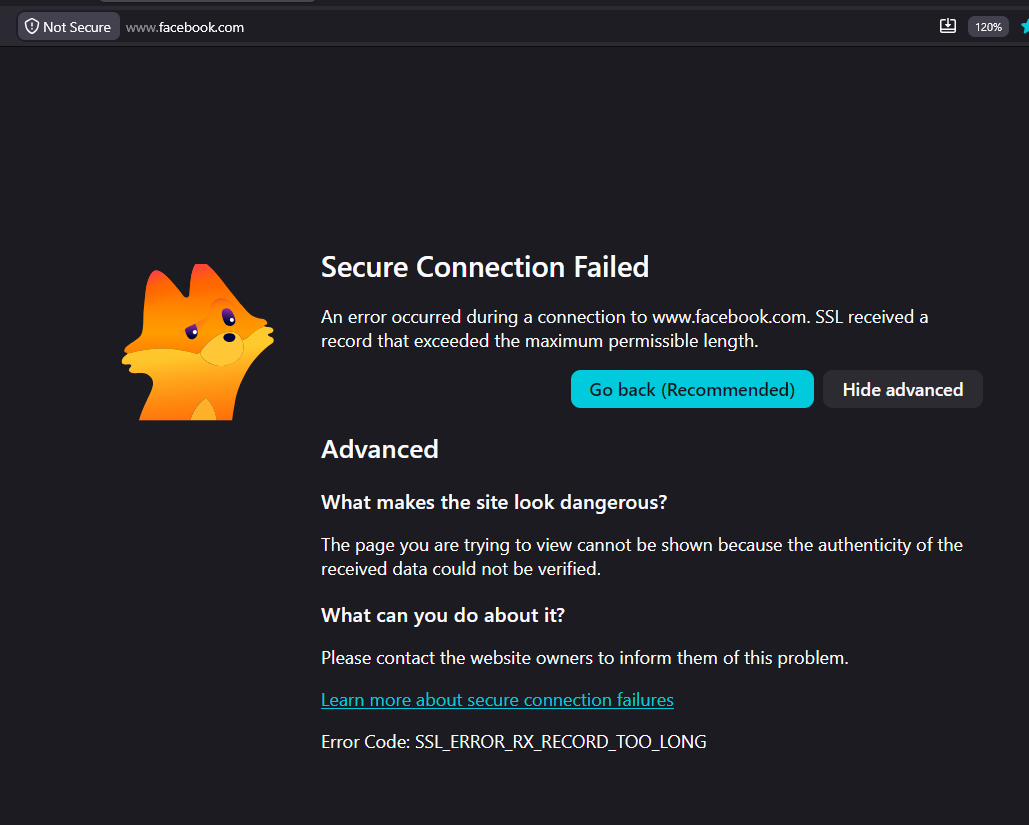
Secure Connection Failed An error occurred during a connection to www.facebook.com. SSL received a record that exceeded the maximum permissible length. … (ďalšie informácie)
Secure Connection Failed
An error occurred during a connection to www.facebook.com. SSL received a record that exceeded the maximum permissible length.
Hi There are image display issues with Firefox. The attached image shows a screenshot comparing the same page on Glazy.org: Chrome on the left and Firefox on the right. T… (ďalšie informácie)
Hi There are image display issues with Firefox. The attached image shows a screenshot comparing the same page on Glazy.org: Chrome on the left and Firefox on the right. The image appears too dark in Firefox, making it difficult to work using that browser. Is this a bug or a setting that needs adjusting? I haven't been able to find a solution. Thanks for your help.
I blocked too many ads on weather.com and now the page won't load. I unstalled adblock but it still wont work.
Hello, I just downloaded v153.0.4 and now there are no wallpapers on my New Tabs or Home Page. No custom url for new tabs either and the Firefox Home is a blank page. Wha… (ďalšie informácie)
Hello,
I just downloaded v153.0.4 and now there are no wallpapers on my New Tabs or Home Page. No custom url for new tabs either and the Firefox Home is a blank page.
What's up with that?
- Andre'a
cusytomize browser wallpaper
Using an external mouse when right clicking to bring up the right click menu, the link is activated and the menu appears When right clicking highlighted text, even in the… (ďalšie informácie)
Using an external mouse when right clicking to bring up the right click menu, the link is activated and the menu appears When right clicking highlighted text, even in the address bar, the highlight is removed (as though it had been left clicked) so, consequently, the menu has the copy'n'paste functions greyed out (as there is now nothing to copy) I've turned off all extensions apart from one called Push Security which my company adds and I can't turn off.
I've only noticed this since the latest update this week 12/07/26 (that's the 12th. July)
regards
Chris
https://i.gyazo.com/74cf268bf4dff38c2945ff3a3227234f.png This is the constant image i keep getting i have asked AI about it and i have already taken multiple steps cleare… (ďalšie informácie)
https://i.gyazo.com/74cf268bf4dff38c2945ff3a3227234f.png This is the constant image i keep getting i have asked AI about it and i have already taken multiple steps cleared caches/history, personal settings and others including
I haven't changed anything in Firefox Browser settings. But when I open a bank statement, it is opening in the firefox browser, not in Acrobat. For years it opened in Ac… (ďalšie informácie)
I haven't changed anything in Firefox Browser settings. But when I open a bank statement, it is opening in the firefox browser, not in Acrobat. For years it opened in Acrobat. I checked Firefox Settings - Downloads for .pdf and it is still set to open them in Acrobat application. I have toggled the options, but still will not open in Acrobat. I have rebooted PC and tried again, still not opening the .pdf in Acrobat. Please advise what I should do Thank you
I recently switched from Debian to Fedora Workstation. Everything works fine, even better under Fedora, except Firefox. There is this quirk, where whenever I wake up my s… (ďalšie informácie)
I recently switched from Debian to Fedora Workstation. Everything works fine, even better under Fedora, except Firefox. There is this quirk, where whenever I wake up my system from suspension, and I try to search something, Firefox just shows a loading sign as if it was loading the page, but I see via the inspect tool that it isn't even sending any HTTPS requests to the server. I know this problem specifically affects Firefox, because other programs that require an internet connection, such as fetching mail via Thunderbird or installing packages via DNF work completely fine. In order to get Firefox to actually work, I have to completely close and reopen the application, forcing me to lose unsaved work in some cases. I've tried everything, from restarting my machine to waiting to see if it will be patched in a future update, but nothing has gotten better. Please help me. Thank you in advance.
I've bought many download images through Etsy, but I find I cannot access them through Etsy's web site, nor through the sellers web site. I get a message "problem loadi… (ďalšie informácie)
I've bought many download images through Etsy, but I find I cannot access them through Etsy's web site, nor through the sellers web site. I get a message "problem loading page"
firefox on windows 11, keeps blocking my camera and Microphone despite express permissions to allow, i look in permissions and the site is clearly marked to allow camera,… (ďalšie informácie)
firefox on windows 11, keeps blocking my camera and Microphone despite express permissions to allow, i look in permissions and the site is clearly marked to allow camera, but when i goto sitye, no camera or mic is allowed until i delete the permission that is supposed to allow it.
I have counselling at https://survivorswestyorkshire.whereby.com/chrissy
I allow my camera and mic.
I return to the site and it tells me camera and microphone blocked.
I goto0 settings>Permissions>Camera
It clearly states that the website is allowed to use the devices, but when on the website the devbices are blocked. Whats messed up is, if i delete your settings>Permissions>Camera, it allows me to use my camera and mic, until i refresh the webpage and its blocked again.
This makes zero sense and is every reason for me not to use Mozille Firefox as a browser at all.
Sincerely
Complex Autist
beim öffnen meines e-banking (UBS) erhalte ich viele textfehler bis zu Unkenntlichkeit. beim öffnen mit zB. edge ist der Text korrekt. Was muss ich einstellen?