


Menus are transparent in Win10 desktop Firefox

I use Win10 Firefox 153.0 x64 on my laptop, and any time I select a menu, the background is transparent, so I can't see the actual menu options, I have to guess what they say when selecting them. Please either fix this, or tell me how to fix this.
Vybrané riešenie
Hi,
Try Firefox Troubleshoot Mode to see if the problem goes away. Firefox Troubleshoot Mode (previously known as Firefox Safe Mode) is a special diagnostic mode that temporarily turns off hardware acceleration, disables add-ons (extensions and themes) and resets some settings. See the Use Troubleshoot Mode in Firefox article for details.
If Firefox is open, you can restart in Firefox Troubleshoot Mode from the Help menu:
- Click the menu button
 , click Help, select Troubleshoot Mode and click Restart in the "Restart Firefox in Troubleshoot Mode?" dialog that opens.
If Firefox is not running, you can start Firefox in Troubleshoot Mode by holding the Shift key when you open the Firefox desktop or Start menu shortcut. When the Firefox Troubleshoot Mode window appears, select "Open".
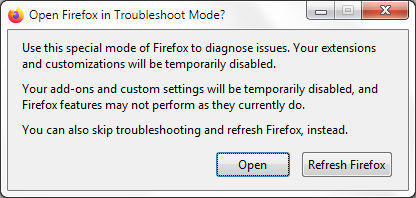
If the issue is not present in Firefox Troubleshoot Mode, your problem is probably caused by an extension, theme or hardware acceleration. Please follow the steps in the Troubleshoot extensions, themes and hardware acceleration issues to solve common Firefox problems article to find the cause.
To exit Firefox Troubleshoot Mode, just close Firefox and wait a few seconds before opening Firefox for normal use again. (If you can't exit Firefox Troubleshoot Mode, please see Firefox is stuck in Troubleshoot Mode).
When you figure out what's causing your issues, please let us know. It might help others with the same problem.
Všetky odpovede (7)
OK nm, I think it was because layout.css.backdrop-filter.force-enabled was set to true for some reason.
...Nope, it's still doing it. sigh
Vybrané riešenie
Hi,
Try Firefox Troubleshoot Mode to see if the problem goes away. Firefox Troubleshoot Mode (previously known as Firefox Safe Mode) is a special diagnostic mode that temporarily turns off hardware acceleration, disables add-ons (extensions and themes) and resets some settings. See the Use Troubleshoot Mode in Firefox article for details.
If Firefox is open, you can restart in Firefox Troubleshoot Mode from the Help menu:
- Click the menu button , click Help, select Troubleshoot Mode and click Restart in the "Restart Firefox in Troubleshoot Mode?" dialog that opens.
If Firefox is not running, you can start Firefox in Troubleshoot Mode by holding the Shift key when you open the Firefox desktop or Start menu shortcut. When the Firefox Troubleshoot Mode window appears, select "Open".
If the issue is not present in Firefox Troubleshoot Mode, your problem is probably caused by an extension, theme or hardware acceleration. Please follow the steps in the Troubleshoot extensions, themes and hardware acceleration issues to solve common Firefox problems article to find the cause.
To exit Firefox Troubleshoot Mode, just close Firefox and wait a few seconds before opening Firefox for normal use again. (If you can't exit Firefox Troubleshoot Mode, please see Firefox is stuck in Troubleshoot Mode).
When you figure out what's causing your issues, please let us know. It might help others with the same problem.
It was the hardware acceleration. -_-; I thought I'd already turned that off. Thank you for your help!
But... does that mean layout.css.backdrop-filter.force-enabled should be set to true?
For me, it's false (by default)... So maybe not? But unfortunately I don't have any expertise here
No, it's not enabled. Depending on your system it may not have any effect:
or it's a diagnostic pref to un–force–disable those crashing drivers.
Upravil(a) jbr dňa
Thanks, guys!