


It no longer shows a 'sent' option at the top left corner when I am replying. I deleted it by mistake and I need it back

I can't send out my reply emails or on new ones b/c I mistakenly deleted the 'sent' option at the top. Actually all the options at the top are gone, including 'forward' etc. This is b/c I clicked with the R mouse on 2 choices there, (which I can't remember what they were called). I did this b/c the 'sent' word had gone gray and I was trying to fix the situation. My emails stopped going in the sent folder and turned up in drafts. I tried sending them from there but it came up with no send option too. Then I finally found 4 emails I was trying to send out in the 'outbox' which I never use! Eventually the computer asked if I wanted the unsent to be sent and it did work then. But I very much would like the former usual configuration to come back please for sending out emails. This is my request here. Interestingly some that went in the drafts were incomplete and did not include all my words! Strange. This is all on my Windows 11 desktop which I prefer to use. Interestingly also, my cell phone suddenly won't recognize my usual long time email address! So I can't forward photos off my cell phone to my Thunderbird (gmail) inbox now. This happened a few days ago, before today's problem. When I try, it says my email address in invalid!! And yet it is receiving the emails on gmail on the phone. But it also wouldn't let me send or even open up 'drafts' on the phone. Emails are arriving in my T-bird inbox all right on my desktop. 'T-bird is the default client on start-up'. On my desktop, my Bitdefender says my computer is 'safe' so there does not appear to be a problem there.
Všetky odpovede (2)
If the send icon turned grey your computer was not connected to the internet, or you had placed Thunderbird in offline mode (but in that those cases it should change to send later not just go grey) SO just grey usually means that the email address entered in the to is simply not valid. Often there is a space before or after the entry or you have used an address book entry that does not actually have an email address.
I guess you have somehow managed to disable the composition toolbar by right clicking on the toolbar or menu. If you have neither of those toolbar to right click on press the F10 key in the compose window to make a menu bar visible to right click on
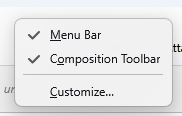
Thanks David for suggesting the ALT key. This did work, as it brought up File etc and then Send Now. But those options do not stay there as they used to. So to send an email I will always have to press the ALT key first. Is there not a way to change it all back in settings somewhere? I did look up info in Account Settings and did make sure my sent emails go in to my sent folder, which they are now doing again. But I could not find a setting for this specific issue. I would have stayed with the thread but as I couldn't email out this did not seem possible. Now I see in future I will go to 'My Questions' pg in my profile to see the posts. Thanks again, and I hope you can help restore the former set-up with File, Edit, View, etc, staying in place in email replies.