


Backup settings only
I'm reading this> https://support.mozilla.org/en-US/kb/thunderbird-export#thunderbird:linux:tb148 Looks great but all of my messages sit on IMAP servers and I don´t need a backup of those. I _do_ need a backup of settings, passwords, pgp keys, to move to another workstation. It is unclear what exactly is exported.
Vybrané riešenie
Johannes, I understand. That message is confusing.
Messages stored in POP folders and local folders (not in IMAP folders) are exported. Apparently, the message author chose not to say all that.
Čítať túto odpoveď v kontexte 👍 0Všetky odpovede (8)
I recommend this approach: everything in the profile is captured: settings, passwords, accounts, messages
- start thunderbird on old PC
- click tools>export and then click 'open profile folder'
- exit thunderbird
- copy profile content to external media
- install thunderbird on new pc, downloaded from thunderbird.net
- in receiving PC, click help>troubleshootinginformation
- scroll to 'profile folder' and click 'open folder'
- exit thunderbird
- now, paste contents of exported profile, overlaying contents of profile.
- if there is a compatibilitie.ini file, delete it
- restart thunderbird
TIP: if IMAP accounts that have HUGE message folders, you can delete the message folders prior to the copy and they will be recreated on new PC. (Do the DELETE in profile when Thunderbird NOT RUNNING, e.g. imapmail\<IMAPaccount>\inbox
I just went with the export. Synced it with nextcloud and on the new machine in thunderbird go to hamburge/tools/import (a bit tricky as it starts with attempts to create a new account)
The import worked like a breeze:
- Asked for pw for all accounts
- Started oath2 for google, yahoo and microsoft accounts.
What does not work is OpenPGP keys.
This key could not be found! If you want to use it you must import it to Thunderbird ''
They are not part of the export. Which is a bit silly as those are the most tricky part of moving. I understand the reason. but tricky none the less (now where have a i put me private keys …🤔
IMAP mails are not part of the export. That is not clear in the UI.
Upravil(a) johannes dňa
Omitting IMAP messages reduces the size of the export, and they are repopulated on a restore.
Yeah I don't want the IMAP messages in an export. They will be downloaded and accessible as soon as the accounts are setup.
The export only talks about a 2GB limit but does not mention if it makes a backup of the messages (which it should not, as they sit in the IMAP server). Hence my question.
johannes said
Yeah I don't want the IMAP messages in an export. They will be downloaded and accessible as soon as the accounts are setup. The export only talks about a 2GB limit but does not mention if it makes a backup of the messages (which it should not, as they sit in the IMAP server). Hence my question.
NO it copies nothing from the imap mail folder, or passwords.
Matt said
johannes said
Yeah I don't want the IMAP messages in an export. They will be downloaded and accessible as soon as the accounts are setup. The export only talks about a 2GB limit but does not mention if it makes a backup of the messages (which it should not, as they sit in the IMAP server). Hence my question.NO it copies nothing from the imap mail folder, or passwords.
That is indeed very cool. I like that it does not copy the messages. But look what it says when making an export...
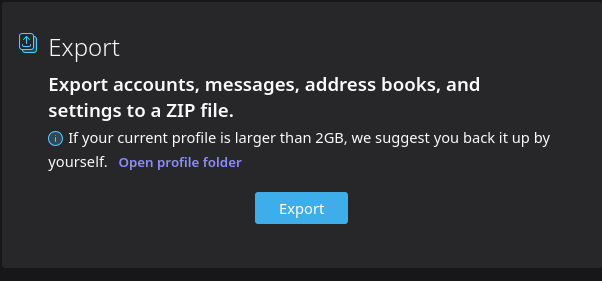
What are you asking? It states that if the size exceeds 2 gb that you may do better with your own export. Which is true, People have major problems when they create large zip files that then cannot be imported and they're stuck with the unexpected problem of reconstruction.

Vybrané riešenie
Johannes, I understand. That message is confusing.
Messages stored in POP folders and local folders (not in IMAP folders) are exported. Apparently, the message author chose not to say all that.