


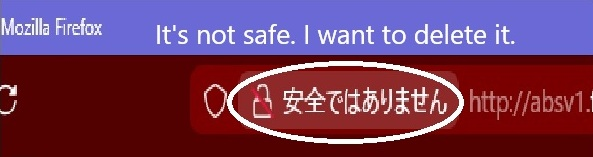
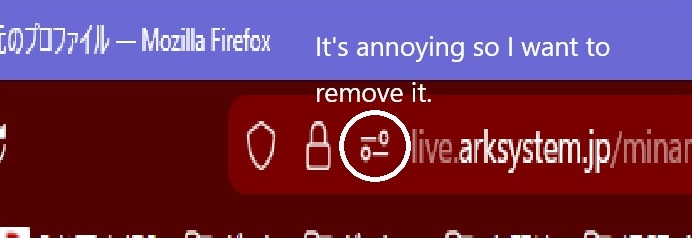
The part displayed in the Firefox address bar is annoying
Hello. I have some questions. I want to delete the image, but I don't know how. How can I do this? I've looked into it, but I couldn't find a solution, so I came to ask for advice.
Hello. I have some questions. I want to delete the image, but I don't know how.
How can I do this?
I've looked into it, but I couldn't find a solution, so I came to ask for advice.
Vybrané riešenie
Hello
With the help of Browser Toolbox. https://firefox-source-docs.mozilla.org/devtools-user/browser_toolbox/index.html
You can try an code userChrome.css
[data-l10n-id="urlbar-trust-icon-notsecure-label"]{display:none!important;} #permissions-granted-icon{display:none!important;}
https://www.youtube.com/watch?v=nVlkotzyFng
Čítať túto odpoveď v kontexte 👍 1Všetky odpovede (2)
Vybrané riešenie
Hello
With the help of Browser Toolbox. https://firefox-source-docs.mozilla.org/devtools-user/browser_toolbox/index.html
You can try an code userChrome.css
[data-l10n-id="urlbar-trust-icon-notsecure-label"]{display:none!important;} #permissions-granted-icon{display:none!important;}
Thank you, Agent virtuel.
I was able to successfully hide it using the userChrome.css code you provided.
Thanks to you, everything is now fine.
Thank you so much.