


Send folder is not set up

You sent six codes which I did not get on my Android phone. I had to go online to get the code numbers. Something's wrong with this all.
Nothing is going into any of the sent folders that I have sent, I am not getting emails, like your codes, properly and I'm using this account for business.
I cannot find a way to refresh Mozilla, nor can I find a way to associate my sent folder to receive sent emails although my server is not having this problem showing them.
I've read directions on Google I can't even get to anything like that to make a change.
Please help please advise what's wrong with this? Thank you, Deborah
Všetky odpovede (5)

Can you carify what you mean by "nothing is going into any of the sent folders that I have sent"?
A. You're not receiving any emails for a particular account. B. You're not receiving emails which you expect to arrive/show in a folder other than "Inbox". C. After sending an email, it is not being moved to the "sent mail" folder.
For point B, you need to enable sync on any custom folders you have. To do this...
1. Open the account list. 2. Select the applicable account. 3. Press "manage folders" (bottom of list). 4. Tap desired folder. 5. Toggle "sync" on.
Repeat for each required folder.
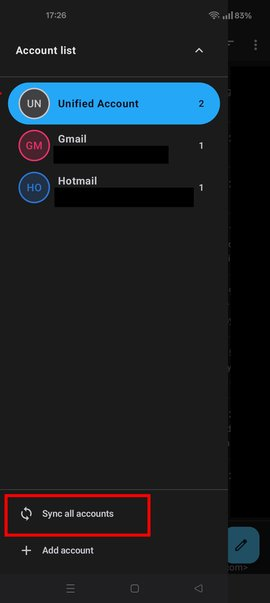
To manually sync accounts ... 1. Open the account list. 2. Tap the down arrow. 3. Tap the "Sync all accounts" button.
Please also ensure the app is excluded from any android battery optimisation and allowed to run in the background.
1. Long press the Thunderbird launcher icon. 2. Select "App Info" 3. Tap battery usage. 4. Toggle "Allow background activity" to ON
Upravil(a) Platform34 dňa
Thank you for your response ...
When I send an email nothing appears in my sent folder. The six codes finally came but the codes came over an hour later. Can you tell me how to refresh this email program please? I could have refreshed and perhaps received the codes they were sending to set up an account.
I would say B and C apply. I followed all of your directions to the best of my ability, the only thing under my folders not selected as push. I sure hope this clears us up, I really appreciate you taking the time to help me. Thank you
No problem ..
A refresh is performed by pressing the "sync all accounts" button as described in my previous reply. I've attached a screen shot for reference.
In regard to emails not being moved to your sent items folder...
1a. Navigate to: settings > account > sending mail 1b. Check "Upload sent messages" (to sent folder after sending) is ticked.
2a. Navigate to: settings > account > folders. 2b. Check "Sent folder" has a folder name assigned, usually it should say Automatic (sent). 2c. Set the folder if it shows a value = none (not assigned).
Delayed email fetching is usually due to the app not having permission to run in the background, hence the steps suggested in the previous reply.
You can also enable the "push" service which delivers emails immediately, rather than syncing every 15 minutes. See the guide linked below.
https://support.mozilla.org/en-US/kb/configure-push-email-thunderbird-android
Thank you again for your help.
I went to open each folder individually. Everything is selected under each folder. I am now getting the sent mail in the sent folder! Hooray and thank you,!
I did sync all accounts before when you advised me to.
I have also put push back on because it's immediate and I think that's why I'm not getting those codes that Mozilla was sending me in time.? I had read something in an advised me not to have push selected and so I had removed it.
I will have to go back and reread and get familiar with sync all accounts so I can refresh to get something that is on a 5-minute timeline.
I'm not sure but I think we have resolved everything, I apologize I'm still dealing with all this winter weather and I can't get my vehicles out and I just found out AAA doesn't go on dirt roads ... perhaps they should have stated that before I signed up for it