


I receive emails automatically, but they only go into my inbox. They don't go into folders I've organized with Gmail labels. I can receive emails by clicking on the folder.

Why do I have to do this every time?
<DownloadLink> Why_do_I_need_to_do_this_every_time.mov
https://primedrive.jp/v2/access?key=t9NdG3za99jDrgfT9tuvKw
Is there a setting I can adjust? Or is this just how it is with Gmail?
Všetky odpovede (4)
I presume an IMAP account, as POP only retrieves from inbox. If there are messages in a folder other than the inbox, highlight the folder, rightclick, select properties, and tick to check this folder when retrieving messages. If I misunderstood your issue, please clarify. thank you
david said
I presume an IMAP account, as POP only retrieves from inbox. If there are messages in a folder other than the inbox, highlight the folder, rightclick, select properties, and tick to check this folder when retrieving messages. If I misunderstood your issue, please clarify. thank you
Sorry for the late reply. I didn't know about that setting. After doing a little research, I found that changing this to true would be the same. I want to receive emails in all folders. Are there any disadvantages?
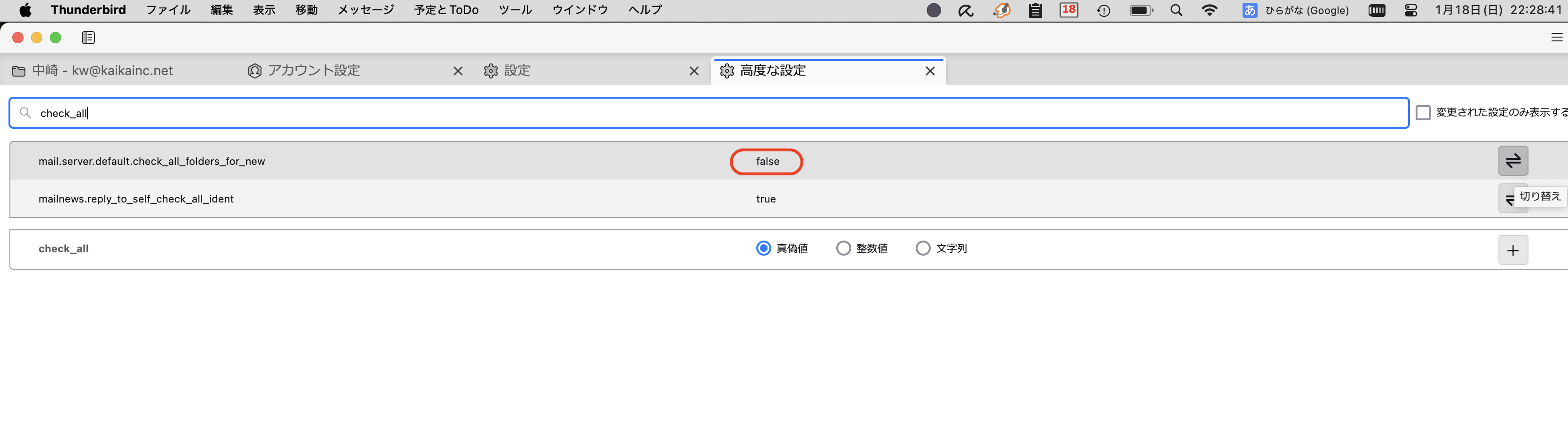
The only disadvantage I see is the use of extra PC and network resources to check folders that you know will never have new messages. If every folder in the account may have new content, then you need that feature. Otherwise, I would select only those that would.

How did you “organize with gmail labels”?
I could not play the video because the download limit has been reached.
What I was thinking: recently someone was not getting mail in some folders, and it turned out that he had created duplicates of the server folders instead of subscribing to the server folders. Have you subscribed to the gmail folders/labels? Or did you try to organize in some other way?
Upravil(a) Rick dňa