


thunderbird not saving attached pdf files unless i open them

i have always used thunderbird and am now up to 64 bit thunderbird 144.0.1 on windows 11 25h2
everytime i am sent a pdf file as an attachment i'm having to get thunderbird to open the file before i can actually save it to disc
everything else, while asking me for a name & location to save the file simply doesn't
btw thunderbird is now configured to ask me what to do with the pdf file and it ALWAYS behaves the same
i don't want to have to open files like pdf's that may not be safe / virus free before being able to handle them
way passed the time you fixed this stupidity terry
Všetky odpovede (3)
Fixed what stupidity? Thunderbird does not make a practice of reducing user security for convenience. Exactly the reverse is true has been true in my experience. That is why scripts do not run and other random issues are actively blocked in Thunderbird. I think you are drawing a rather long bow with your assertion.
Thunderbird handles PDF files internally and displays them in a new tab. If you want something else to happen then there is an option in the settings to change that. That includes setting an external application to handle PDF files if you do not trust the way Thunderbird does it.
since starting in IT in 1987 i've only ever used thunderbird tho 32 bit on stuff like windows 10 or xp
i ran networks with internal corporate email systems before the internet and so called global systems we see now
32 bit thunderbird on 32 bit windows saved pdf files just fine from clicking the save attachment(s) button provided, without having to open them first, i've just fired up an old system and it still does
'tis only the last month or so i've had 64 bit thunderbird on windows 11 25h2, i did not migrate any part of my profiles from my old config
i've always taken the view anything i don't expect to receive or don't recognise or deem suspicious doesn't get opened, especially any sort of attachment - my door is closed 'til i open it
as soon as i received my first pdf attachment under my new config i experienced the issue i described with thunderbird not letting me save the attachment with the button provided @ the bottom right of the screen tho despite going thru the whole charade of giving me a dialogue box asking me where & what i wanted to call it, it DOESN'T - end of
a simple google on the subject showed me loads of people having the same issue
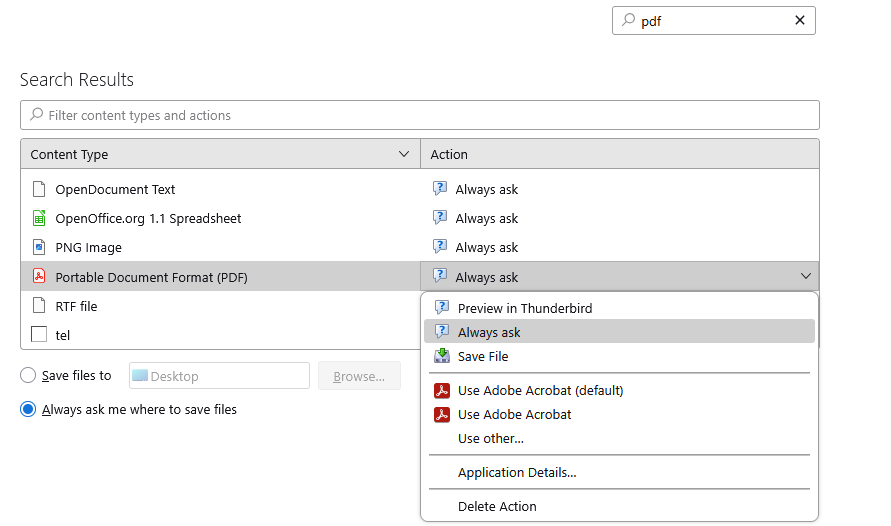
on my own i made sure thunderbird was configured to ask me what to do with the pdf attachment and guess what, it does exactly the same, asks me what & where to save the file then DOESN'T
the picture you have now attached is exactly how my thunderbird is setup and sorry but it DOESN'T work
the only way i can save the pdf attachment is by making thunderbird open it in a separate tab then CTRL-S
sorry but i can't & won't tell it like it ain't
Same issue here after a thunderbird update; the question is not previewing or opening a PDF file attached to an email message. The problem occurs with specific PDF files only, not all, and issue is not being able to "save as" such PDF files. The workaround is opening PDF files attachments using Adobe reader or save them as .txt extension and then renaming the extension as .pdf Seems a bit weird having to do this when the pdf files are perfectly safe. We've already have software to control security issues on emails, in several layers.