


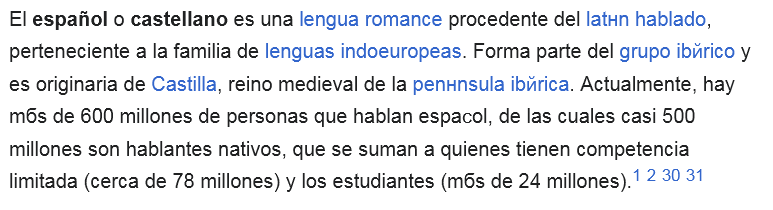
Instead of special symbols (ã and other special letters) i see Cyrillic

It only happens on some websites (Wikipedia for one) and doesn't happen anywhere else in my system. I was unable to root out the reason for this and all solutions seem to be for when there are boxes instead. I don't see boxes, only Russian letters for some reason.
Všetky odpovede (7)
1st. Clear Firefox cache and data
    Menu → History → Clear Recent History...
Restart Firefox and re-visit Wikipedia.
if the problem still exists try
2nd. Try Firefox's Font Settings You can force Firefox to ignore the website's specified fonts to confirm if is font issue
   Menu → Settings → General.
   Go to Language and Appearance → Fonts & Colors → click Advanced...
   Uncheck the box that says "Allow pages to choose their own fonts, instead of my selections above."
   Click OK and reload the Wikipedia page.
If this fixes the issue, it point a local font problem. You should re-enable this option after that.
These solutions didn't help, sorry. I cleaned history "since 00:00"
Ok If 1 & 2 didn't help you, It doesn't seem to be a problem with Firefox, but with your system.
You need to figure out exactly which problematic font is being used.
Go to a Webpage that shows that characters. Right-click on the wrong letter text and select Inspect. This opens the Firefox Developer Tools.
In that panel, look for the Fonts tab. The Fonts tab will show you the exact font file being used by Firefox. Identify the font name.
You need to uninstall/reinstall that font.
On Windows: Go to Control Panel → Appearance and Personalization → Fonts (or search for "Fonts" in the Start Menu). Find the problematic font (e.g., Arial ) and Uninstall.
Restart your computer.
If the font is a standard system font, Windows may automatically reinstall a clean copy on restart, or you may need to find and download a fresh, clean Font version to reinstall.
It is indeed Arial for me but Windows wont let me delete it. "Protected system font"
You can try the system file checker (cmd > sfc /scannow) can scan and repair it
or
try to download Arial font again and re-install
scannow didnt find anything, after that i downloaded Arial and installed all of them (when prompted i said "yes, replace"). Still the same :(

I didn’t have exactly this issue, but searching for mine, I somehow ended up here, and lo, with your tip to use Inspect, I could solve my problem.
So I post the following little report to add scope to the thread.
The problem: In Wikipedia and other websites, pages in Cyrillic would show blocks instead of letters.
(This was only in Firefox, not in Chrome or other browsers, so I thought there might be a problem with cookies. Still, having that many, I was hesitant to clear them all.)
Anyway, with the Inspect command and the Developer tools, I could identify the font as Georgia (😅). By the way, this is on a Mac (Tahoe, all up to date). With Font Book, I could see that the Language Support for the Georgia font didn’t include Cyrillic, so that was a clear hit. Looking further with Font Book, it seemed that there were 2 copies of Georgia installed, so I did a Validate on Georgia and then "remove non-system fonts".
After refreshing the Wikipedia page, only a headline was still in blocks, the rest was OK! Restarted the Mac, all was correct, thank you very much!