


How do I stop the left side from trying to pin tabs

When I move a tab to the far left, it tries to pin it. I don't use or want to use pins. How do I remove this function entirely?
Všetky odpovede (15)
Thanks for this, but it doesn 't solve the problem. It just suggests a lot of us share it!
I know this is not a great workaround, but if you want to move a tab to the start of the tab bar without the risk of dragging too far left, you can use this method:
- right-click the tab
- click Move Tab (or on Windows, you can type v)
- click Move to Start (or on Windows, you can type s)
Your solution works only if one is trying to move a tab to the the farthest right possible: that is, to position it as the first tab. But that's not what I'm trying to do (and from what I read, others as well). I'm trying to rearrange the tabs that are showing at any given moment in time, and sometimes, I want to move a tab to the far left of THIS screen (not all tabs).
Hello
Have you tried the suggestion https://bugzilla.mozilla.org/show_bug.cgi?id=1984420#c8
Found a nice workaround in the meantime though: Just pin a blank tab. That makes it a bit harder to accidentally pin your real tabs.
Thanks, but this really solves nothing.
jsg11 said
Your solution works only if one is trying to move a tab to the the farthest right possible: that is, to position it as the first tab. But that's not what I'm trying to do (and from what I read, others as well). I'm trying to rearrange the tabs that are showing at any given moment in time, and sometimes, I want to move a tab to the far left of THIS screen (not all tabs).
Oh, the "pin zone" behavior is triggered if you drag the tab over the left scroll button. I didn't understand that from the threads I've read so far.
Hello
https://bugzilla.mozilla.org/show_bug.cgi?id=1984420#c24
Add a setting to disable "drag and drop to pin, I tested the value 2000, to see, it works.
Wait and see.
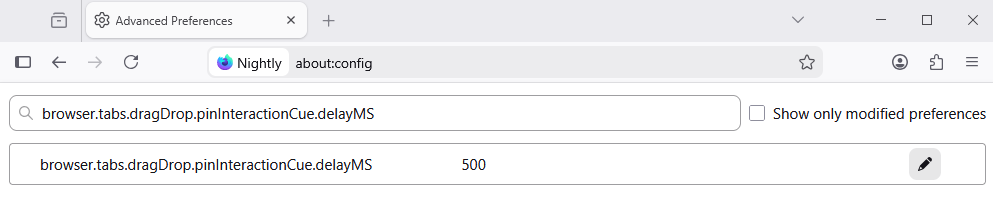
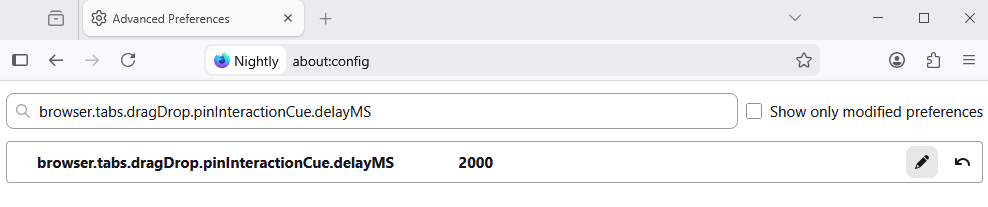
Hello
https://www.firefox.com/en-US/firefox/143.0.3/releasenotes
1 - Go to Configuration Editor for Firefox https://support.mozilla.org/en-US/kb/about-config-editor-firefox 2 - Enter a search term browser.tabs.dragDrop.pinInteractionCue.delayMS

Once I've searched, then what? Should the value be true or false? How do I save the value?
I don't see a save link in the config editor, so I just made the changes and closed the config tab. Neither true nor false seemed to work, but I'm guessing I didn't save either one and that it's still set however it was to begin with.
jsg11 said
Once I've searched, then what? Should the value be true or false? How do I save the value?
This is a built-in preference in the 143.0.3 update that lets you adjust the delay before Firefox assumes you want to pin the tab. You need to update Firefox first, then you can increase the delay from half a second (500 milliseconds) to, say, two seconds (2000 milliseconds).
You didn't answer my questions.
In answer to yours, I don't care about how long it takes. I don't want to pin the tabs at all.
What is Mozilla Connect? https://support.mozilla.org/en-US/kb/what-mozilla-connect
jsg11 said
You didn't answer my questions.
Your questions appear to be based on not having the updated version. They do not make sense for the updated version.
In answer to yours, I don't care about how long it takes. I don't want to pin the tabs at all.
Pinning delayed is pinning denied. You can't always get what you want, but if you try sometimes, you just might find, you get what you need.
I was using version 143.01; now 143.03.
Delayed is delayed.
I don't "need" anything. I would prefer not to have pins. Judging from the notes I saw before writing, I'm not alone.