


My location in Firefox is incorrect

Any time I allow a website to use my location on my home computer, it places me in a suburb in Las Vegas. However, I live near Seattle. This happens on multiple websites including Google Maps and Uber Eats, and on other browsers my location is correct. I'm not running any VPNs or proxy servers, I've verified that my IP address is linked to my correct location, and I've deleted all cache and cookies ("Everything" for time frame) from my history. Is there a way I can have an accurate location again?
Všetky odpovede (4)
Hi, you can test it on https://browserleaks.com/geo . What does this page say?
Hello! Thanks for the suggestion. This website also lists a Las Vegas location. I've attached an image of my results.
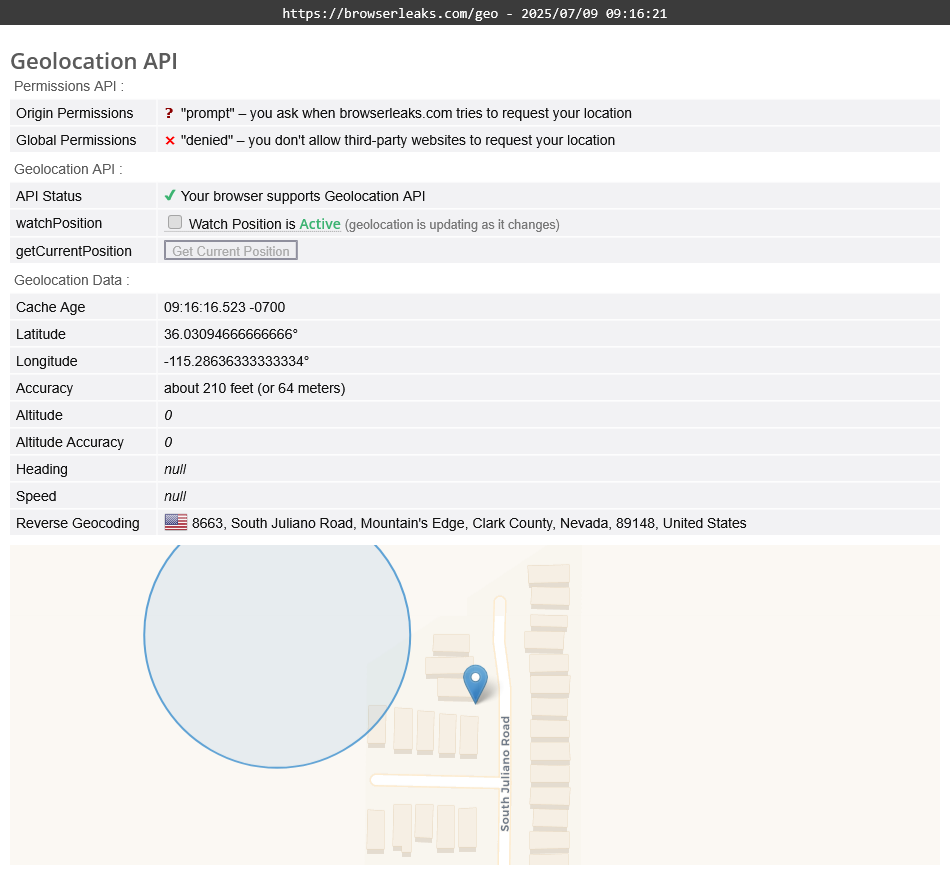
Google determines your location in a peculiar way, and we also are using Google Geolocation Services.
If you set your home or work addresses, they may be used to estimate your location when it’s likely that you’re at one of these places. You can edit home and work addresses in your Google Account. If the location of your home or work was used to help get your search results, the location information at the bottom of the search results page will say "Based on your places (Home) or (Work)."
You can try to enter about:config in the address bar, find geo.provider.network.url preference, and set its value to
data:application/json,{"location": {"lat": 47.620109163157764, "lng": -122.34933913420485}, "accuracy": 50}
then restart the browser. It should help with Uber, but I'm not sure about Google Maps.
Thank you for this. It does help location on other websites, but I mostly utilize location services for Google.
Another note I forgot to include was that this is a new-ish issue. I noticed it started a couple of weeks ago, but prior to that my location was always accurate in this browser.