

Táto téma bola archivovaná.
Ak potrebujete pomôcť, založte prosím novú otázku.

Archivované
Turn off contact (address book) avatars in compose (V128)

While composing a message, I have contacts shown on my left. In that view, there the new T-Bird has a place for avatars for my contacts.
How do I turn the avatars off? I don't use them and I'd like to reclaim the space.
Thanks, Mark.
While composing a message, I have contacts shown on my left. In that view, there the new T-Bird has a place for avatars for my contacts.
How do I turn the avatars off?
I don't use them and I'd like to reclaim the space.
Thanks, Mark.
Všetky odpovede (1)
Do you mean these small icons that indicate if the entry is an individual or a mailing list?
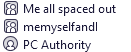
I don't think you can without the use of CSS. https://support.mozilla.org/en-US/kb/userchromecss-js-usercontent-unsupported