

Táto téma bola archivovaná.
Ak potrebujete pomôcť, založte prosím novú otázku.

Vyriešené
Archivované
Show Google search URL in address bar, don't overwrite it with the original search string

Steps to reproduce:
1. Have Google as the default search engine.
2. Type a search string into the address bar.
3. The address bar briefly shows a URL for the Google Search results.
4. The address bar is very quickly overwritten with the original search string.
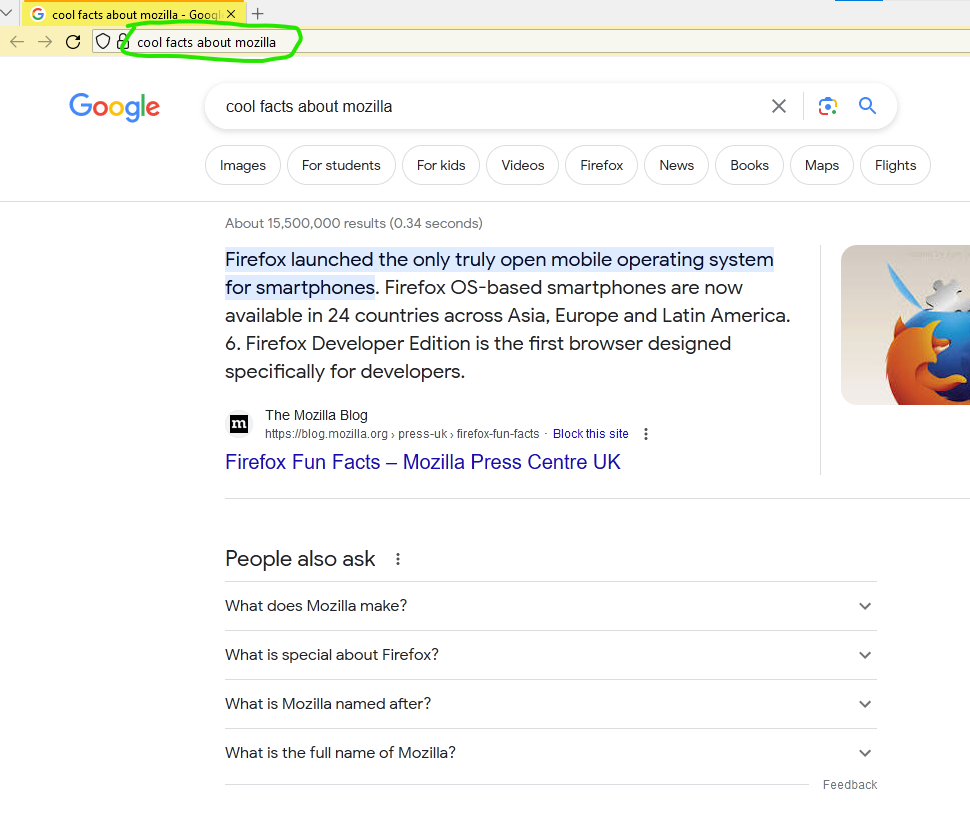
See screenshot for example.
How do I stop step #4 happening? I want the URL to remain in the address bar, for example to be able to give somebody a link which executes the google search.
I think this is new in FF121.
Steps to reproduce:
1. Have Google as the default search engine.
2. Type a search string into the address bar.
3. The address bar briefly shows a URL for the Google Search results.
4. The address bar is very quickly overwritten with the original search string.
See screenshot for example.
How do I stop step #4 happening? I want the URL to remain in the address bar, for example to be able to give somebody a link which executes the google search.
I think this is new in FF121.
Všetky odpovede (1)
Vybrané riešenie
I found the problem: I needed to uncheck "Show search terms instead of URL on default search engine results page" in Settings.
Not sure if the default for this changed, or if I had inadvertently changed it myself.