


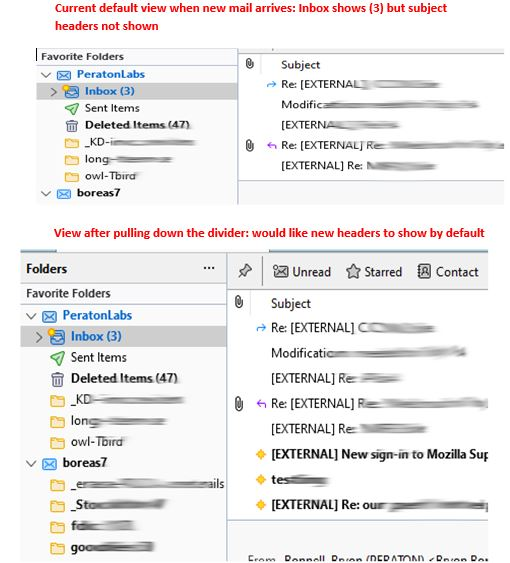
View of newly arriving mail in Thunderbird

I'd like to have the panel that shows subject headers to show newly arriving email. Instead, I have to actively seek the new emails, or position the divider to show them.
Is there a setting or add-on that will cause Tbird to automatically show those new unread emails?
See images
Thanks for all the great work!
Všetky odpovede (3)
I think you will achieve your objective by locating the menu bar at top of that pane (subject, recipient, date) and click the 'Received' column. If that column isn't visible, right-click within the menu bar and tick that entry. Each time you click an entry on that line, the list of emails will sort ascending or descending on that item. That will let you see all incoming together.
Thanks, but no. Ticking received is almost the same as 'date', which was checked; my emails are already sorted by date, with newest on the bottom.
I was hoping that I'd be able to see the header summary of newly arriving email, which is unread. The scrollbar stays on the last read email, hiding the new email.
Tnx
Click the Unread button on the Quick Filter Bar in your picture. Click the pin icon if you want the filter setting retained when switching folders.