


Cannot enable cookies

I seem to be unable to enable cookies. I believe this is causing several problems, including being unable to enable sync.
Všetky odpovede (7)
Do you have extensions installed that deal with cookies ?
Start Firefox in Troubleshoot Mode to check if one of the extensions ("3-bar" menu button or Tools -> Add-ons -> Extensions) or if hardware acceleration or userChrome.css is causing the problem.
- switch to the DEFAULT theme: "3-bar" menu button or Tools -> Add-ons -> Themes
- do NOT click the "Refresh Firefox" button on the Troubleshoot Mode start window
These are not helpful, at all. I tried troubleshooting mode, and the problems persist. I cannot enable Firefox sync, because it complains cookies are not enabled. There is a particular site where I cannot enter responses or create new topics. (It is private, so I cannot reveal the site.) There is an application I must use whose main page does not come up. (Again, it is a non-published application only available to beta developers of the system.)
Can you show what your cookies settings are? see screenshot
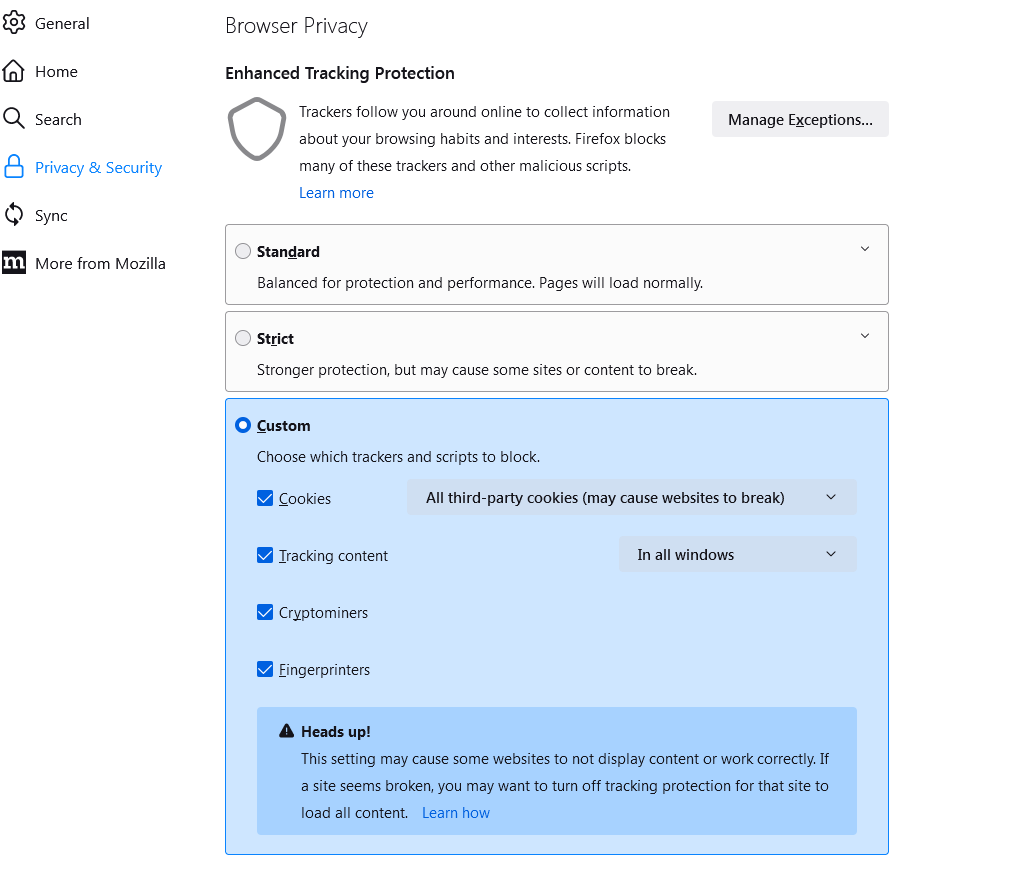

You have probably done what this article mentions but here it is in case.
https://support.mozilla.org/en-US/kb/enable-and-disable-cookies-website-preferences
You can check for issues with Storage (indexedDB).
See also:
If clearing cookies doesn't help then it is possible that the cookies.sqlite file in the Firefox profile folder that stores the cookies got corrupted.
- rename/remove cookies.sqlite (cookies.sqlite.old) and when present delete cookies.sqlite-shm and cookies.sqlite-wal in the Firefox profile folder with Firefox closed in case cookies.sqlite got corrupted.
You can use the button on the "Help -> More Troubleshooting Information" (about:support) page to go to the current Firefox profile folder or use the about:profiles page (Root directory).
- Help -> More Troubleshooting Information -> Profile Folder/Directory:
Windows: Open Folder; Linux: Open Directory; Mac: Show in Finder - https://support.mozilla.org/en-US/kb/profiles-where-firefox-stores-user-data
It suddenly started working all by itself. I literally had done nothing but check its operation since the last time I checked. I had not even shut Firefox down. This happened once before. It quit working and then suddenly started working again in this very specific fashion with no intervention by me. I am not sure I should mark this solved, since I have no firm idea of what the problem was.
Upravil(a) Leslie dňa
What security software do you have?