


Message filter to catch dangerous links

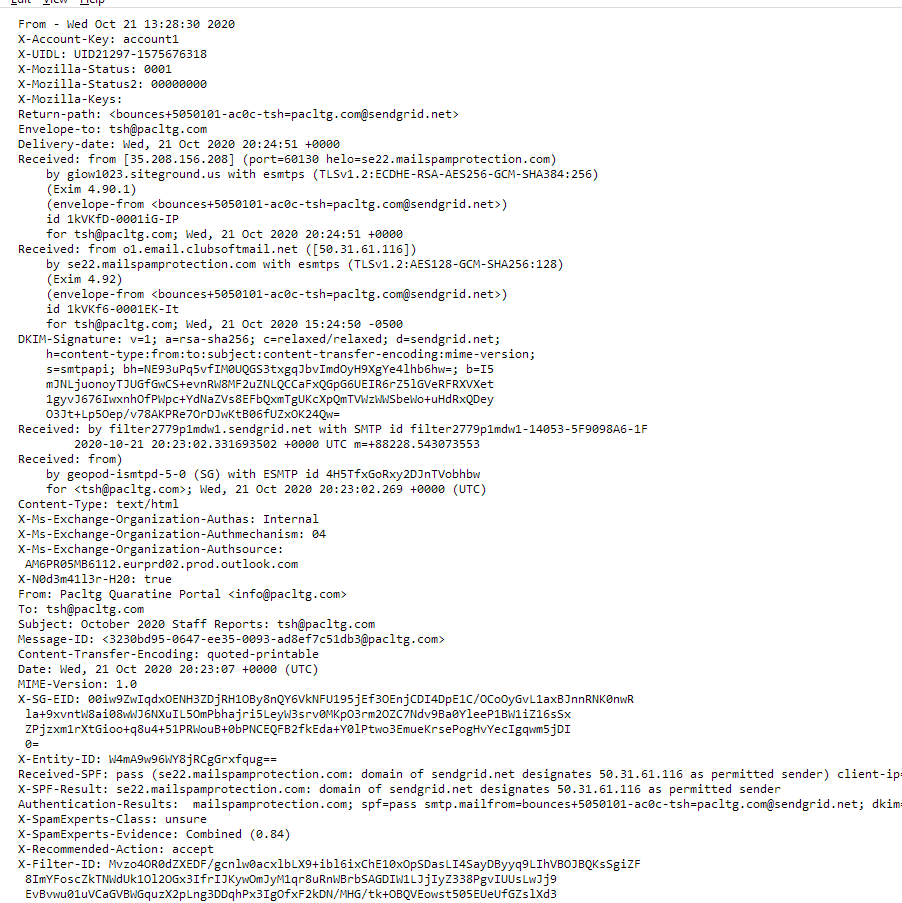
I have received a "phish"ing message spoofed from one my own (forwarding) email addresses. It asks to click on a link at "Sendgrid.net", which is surely a scam. I created a message filter to catch the text "Sendgrid.net" in the BODY and send it to spam folder but it does not work. I have to conclude that the link is not in the BODY of the message.
Is it possible to make this filter? (The message source is attached)
Všetky odpovede (4)
Vybrané riešenie
Click Customize in the filter window (see picture) and add Received as a custom header, and filter on sendgrid. You can do the same with Classic Search (Ctrl+Shift+F) to test a filter rule.
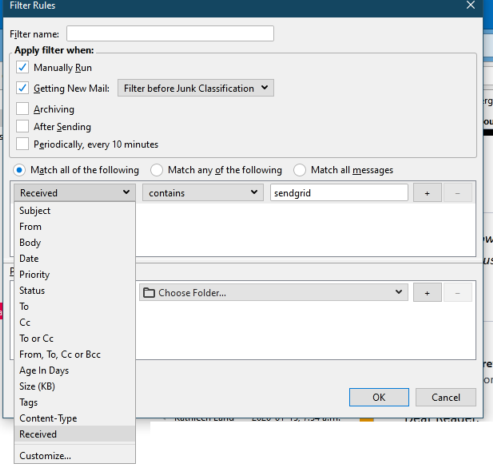
Thank you very much. It'd be so much more of value if I knew how this trick works. When I added a "Custom header" it seems the name entered is arbitrary, but is there a meaning to "Received" built-in? if yes is there a list of special header names?
A custom header can be any header that is shown in the message source (Ctrl+U).
https://mediatemple.net/community/products/dv/204643950/understanding-an-email-header
Thanks! That occurred to me after I sent the message, as it was the only possibility. It's very useful.