


What happened to "Ask to activate" option?

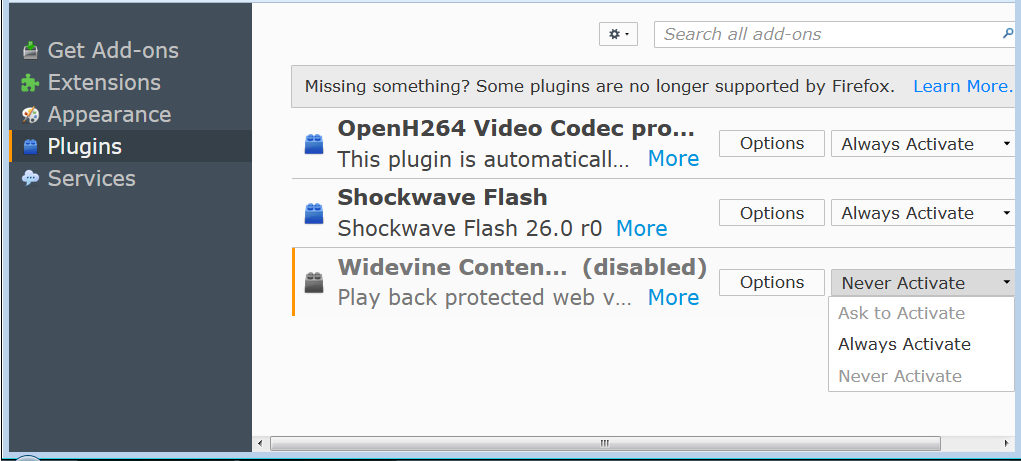
What happened to "Ask to activate" option for plug-ins? Now I seem to only get Always Activate or Never Activate. Ask to Activate is grayed out.
Vybrané riešenie
The 'Ask to activate' option for these plugins is no longer available.
See :
https://www.ghacks.net/2016/04/11/firefox-drm-and-the-end-of-npapi/
Všetky odpovede (9)

Hello, you should be able to toggle "Ask to Activate" anyways. :)

Start Firefox in Safe Mode {web link} by holding down the <Shift> (Mac=Options) key, and then starting Firefox.
A small dialog should appear. Click Start In Safe Mode (not Refresh). Is the problem still there?
Vybrané riešenie
The 'Ask to activate' option for these plugins is no longer available.
See :
https://www.ghacks.net/2016/04/11/firefox-drm-and-the-end-of-npapi/
Note that you can find the DRM setting (Google Widevine) in Options/Preferences
- Options/Preferences -> Content: Play DRM
- https://support.mozilla.org/en-US/kb/enable-drm
Well you all seem to be contradicting each other, but I'm concluding from Happy 112's link that "Ask to activate" is no longer an option, unfortunately. Thanks.
Yes, you can either enable or disable these special plugins that come with Firefox. When DRM is disabled in Options then Firefox won't use the Widevine plugin anyway.
Yes I disabled it, but wonder if FF will still let me know if a site I visit requires it...
cfcentaurea said
Yes I disabled it, but wonder if FF will still let me know if a site I visit requires it...
Sites that need DRM will let you know : You may encounter sites where content playback is not possible without DRM enabled. You may always turn DRM playback on again by opening the Options => Content panel and putting a check mark next to Play DRM content. After checking the checkbox, HTML5 DRM playback will be re-enabled and the Google Widevine CDM will download automatically.
Thanks!