


Can receive but not send emails and tried the help page hints already

Hi, I just switched from Apple Mail to Thunderbird and I with both my providers (a University Server for work-mail and a mail provider from Germany for private messages) I can receive but not send messages. I tried everything on the "cannot send messages" page https://support.mozilla.org/en-US/kb/cannot-send-message, it does not work.
I am using Mac OSx Sierra on a 2012 Macbook. Thanks for your help!
Vybrané riešenie
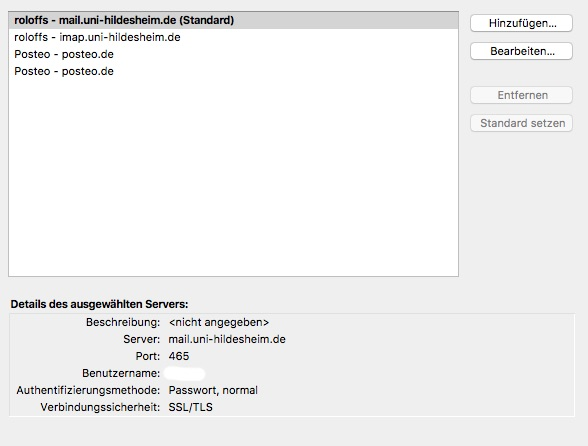
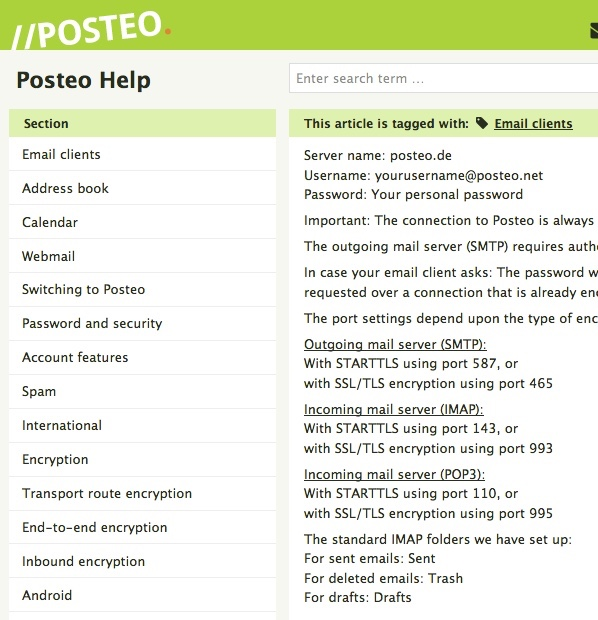
Those settings look good. It's rare that someone looking for help provides such useful info as you have with those screenshots. Awesome.
Cannot send mail has a bit more troubleshooting info.
Verify Thunderbird is in online mode, not offline mode: click "File -> Offline"; "Work Offline" should be unchecked.
Temporarily disable anti-virus & firewall and test sending.
Disable all Thunderbird add-ons, and test sending.
Beyond that, I am unable to help.
Všetky odpovede (5)
Did you verify the SMTP server settings with the e-mail providers? SSL or not SSL, port numbers?
Hi, thanks for helping me, I really appreciate it. I did check the server settings, but I'll attach some screenshots for you.


Vybrané riešenie
Those settings look good. It's rare that someone looking for help provides such useful info as you have with those screenshots. Awesome.
Cannot send mail has a bit more troubleshooting info.
Verify Thunderbird is in online mode, not offline mode: click "File -> Offline"; "Work Offline" should be unchecked.
Temporarily disable anti-virus & firewall and test sending.
Disable all Thunderbird add-ons, and test sending.
Beyond that, I am unable to help.
Thanks Bruce, I think my problem is the Avast-Antivirus-Protection. I disabled it and now at least my Private Mailaccount works. Regarding my other Account I guess I'll just have to call the IT support at university. If you know any tricks regarding Avast and Thunderbird, I'll appreciate it!
I am using Avast Pro Antivirus also, but am not having any problems with it and Thunderbird.
The article Antivirus software has some useful tips for using antivirus with Thunderbird.
The article Thunderbird:Testing:Antivirus Related Performance Issues has a section for Avast.
Avast Antivirus: Troubleshooting warnings about invalid mail server certificates when sending and receiving e-mails is also something that might help.