


Windows 10 reached EOS (end of support) on October 14, 2025. If you are on Windows 10, see this article.

Поиск в поддержке

Избегайте мошенников, выдающих себя за службу поддержки. Мы никогда не попросим вас позвонить, отправить текстовое сообщение или поделиться личной информацией. Сообщайте о подозрительной активности, используя функцию «Пожаловаться».

Подробнее

Help configuring alternate/secondary identities

  • Нет ответов
  • 0 имеют эту проблему
  • Открыта

I have connected a Google Workspace (Gmail) account to Thunderbird, let's call it scott.harper@myorg.org. I am able to send, receive, and reply from this account as expected.

In my Google Workspace configuration, I have an alias address forwarded to my account, let's call it info@myorg.org. I receive messages addressed to "info" just fine. But when I send or reply to messages addressed to "info", I'm running into a problem.

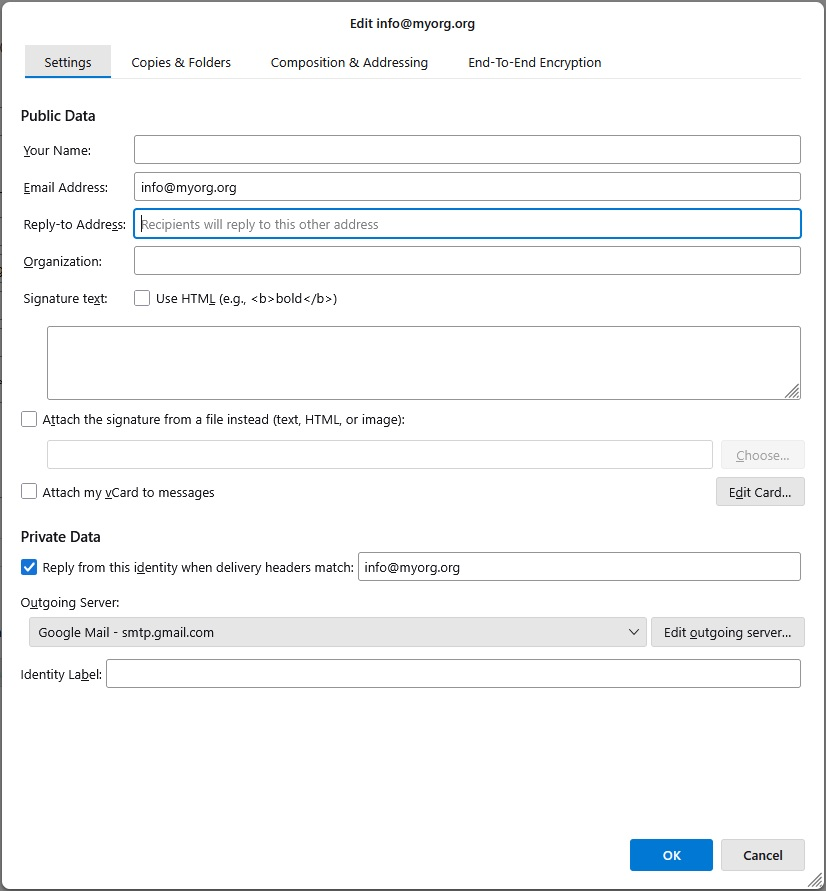
In the Account Setting I opened Manage Identities, and added info@myorg.org as an alternate identity. I then edited the Private Data for that identity so that the "Reply from this identity when delivery headers match" option is checked, and set to match info@myorg.org. See attached image.

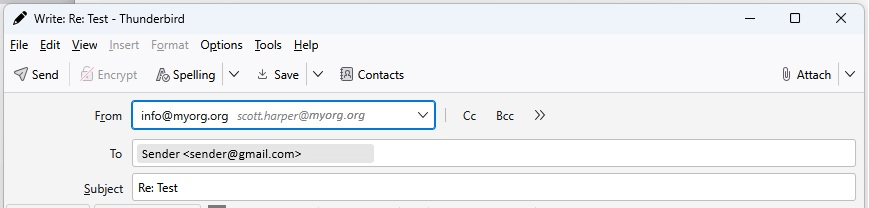
When I reply to an incoming message, the From field appears to be (sort of) correct... it shows from info@myorg.org, but next to it (in italics) is the primary account identity, scott.harper@myorg.org. See the other attached image. This is also the case when I compose a new message and select the info identity.

In both cases, when the message arrives at the destination inbox, it is from scott.harper@myorg.org instead of "info".

I'm assuming I don't have the matching rule, or some other setting configured correctly. Would appreciate any other tips/ideas.
I have connected a Google Workspace (Gmail) account to Thunderbird, let's call it scott.harper@myorg.org. I am able to send, receive, and reply from this account as expected. In my Google Workspace configuration, I have an alias address forwarded to my account, let's call it info@myorg.org. I receive messages addressed to "info" just fine. But when I send or reply to messages addressed to "info", I'm running into a problem. In the Account Setting I opened Manage Identities, and added info@myorg.org as an alternate identity. I then edited the Private Data for that identity so that the "Reply from this identity when delivery headers match" option is checked, and set to match info@myorg.org. See attached image. When I reply to an incoming message, the From field appears to be (sort of) correct... it shows from info@myorg.org, but next to it (in italics) is the primary account identity, scott.harper@myorg.org. See the other attached image. This is also the case when I compose a new message and select the info identity. In both cases, when the message arrives at the destination inbox, it is from scott.harper@myorg.org instead of "info". I'm assuming I don't have the matching rule, or some other setting configured correctly. Would appreciate any other tips/ideas.
Приложенные скриншоты

Для ответа на сообщения вы должны войти в свою учётную запись. Пожалуйста, задайте новый вопрос, если у вас ещё нет учётной записи.