


cant access my tiscali/talktalk emails comes up as endefined emails and it wont let me in

since downloading firefox 4 i cant access my tiscali/talktalk emails it just says i have undefined emails and wont let me go to my inbox i would love my old firefox back I DO NOT LIKE FF4
Toate răspunsurile (7)
This worked for another user I assisted yesterday, so I trust it will for you too.
- In the location bar at the top, type: about:config and hit Enter.
- In the filter at the top, copy/paste the following: general.useragent.override This will display a blank page.
- Right click anywhere in the blank area and choose "New" and then "String". In the dialog box which appears, copy/paste general.useragent.override again and click OK. The dialog box will remain on screen, but you'll see that name appear above where it previously said "Enter Preference Name".
- Next, copy/paste the following: Mozilla/5.0 (Windows NT 5.1; rv:2.0) Gecko/20100101 Firefox/4.0
- Click OK and then go to File | Exit. Restart Firefox again and try and login to Tiscali.
- I've uploaded a screenshot for you to illustrate the steps above.
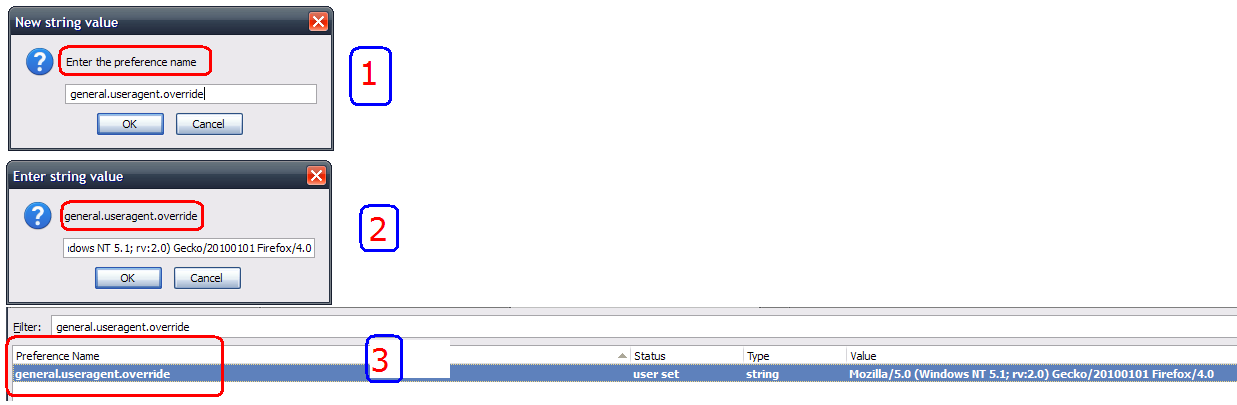
You can also try to clear the cache and the cookies from sites that cause problems.
- "Clear the Cache": Tools > Options > Advanced > Network > Offline Storage (Cache): "Clear Now"
- "Remove the Cookies" from sites causing problems: Tools > Options > Privacy > Cookies: "Show Cookies"
Hi,thanks for replying to my problem with ff4,since asking for solutions I found a site which gave me a download for ff3.6and everything is back to normal.I will keep your solution for a time when ff will not support 3.6 anymore.Once again thankyou.(its nice to know there are people willing to help)
If you've installed 3.6 again, make sure you have 3.6.16 (go to Help | About Firefox). If you have an earlier version, click Help | Check For Updates to get it.
It's important that you do that because there was a security breach at Comodo which is an SSL certificate provider whereby a number of fraudulent certificates were inadvertently issued. This allows a hacker to impersonate any site including online banking and your browser will not display a warning. 3.6.16 blacklists those certificates.
hi,yes thanks for that,have checked and am running that version. thankyou
You're welcome.
I also have this problem. The solution is quite simple, just logon using Internet Explorer, it works without any problems. Perhaps Firefox will work too when they update it.