


The tab key does not move between form fields correctly in Firefox 4

The behavior of the tab key within web page forms has changed since I upgraded to Firefox 4. The tab key used to skip between text input boxes. It now skips between text input boxes, buttons, and drop-down menus.
Toate răspunsurile (10)
I've noticed that under some circumstances it selects the div field depending on the CSS setting overflow:auto. Changing the autoflow to any other value eliminated the problem. Didn't happen in Firefox 3.x
OK, how does one change the autoflow setting?
See show for Mac:
I get the same result whether "Text boxes and lists only" is selected or "All controls" is selected".
I too have noticed this issue, especially when using "overflow: auto". Here is some html...
<div>
  <label for="id_username">Username</label>
  <input type="text" name="username" id="id_username">
</div>

<div id="password_div_id">
   <label for="id_password">Password</label>
   <input type="password" id="id_password" name="password">
</div>
If the "div" elements are set to "overflow: auto" in their CSS, then selecting the "username" field then hitting tab will actually tab you to the second div (ID'd as "password_div_id"), rather than jumping you to the password input.
Not sure if this is the expected behavior or not.
Modificat la de markhildreth
This has to be a bug. There's no logical reason why one would want to tab to non-field elements within a form.
I have checked in IE9, Chrome, Safari & Opera and this doesn't happen with them.
Just set overflow:hidden on the offending divs and the problem has gone away.
That's great for web pages that I make but I can't control other people's web pages, which is the main problem.
Maybe this will be sorted out with an update, or a lot of developers are going to have to change a lot of css.
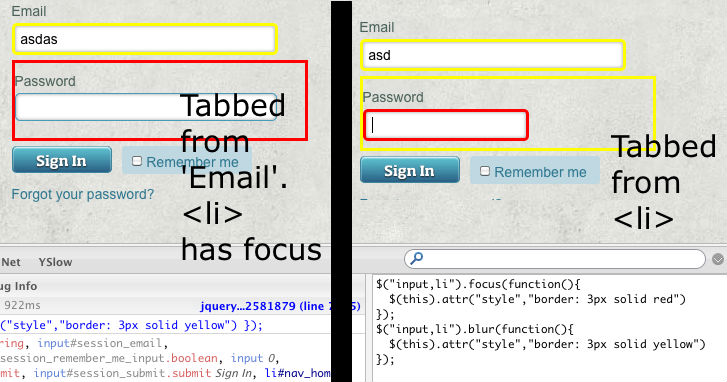
This is also the case with <li> tags with overflow:auto. If you want some jQuery to debug this yourself:
 $("div,input,li").focus(function(){
   $(this).attr("style","border: 3px solid red")
 });
 $("div,input,li").blur(function(){
   $(this).attr("style","border: 3px solid yellow")
 });
Modificat la de nickmalcolm