


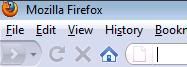
My firefox back button has disappeared for no reason!

The forward button and everything is still there. I tried going to View -> Toolbars and unchecking and checking the navigation toolbar, but it doesn't help. Here's what happened: http://i292.photobucket.com/albums/mm31/richboyliang/backbuttongone.jpg
Toate răspunsurile (1)
Delete localstore.rdf or rename the file to localstore.rdf.sav in the Profile Folder to test if the file is corrupted.
See http://kb.mozillazine.org/Corrupt_localstore.rdf (caution: do not delete the localstore.rdf file in the Firefox program installation folder)
Note: Deleting the file localstore.rdf will reset the customizations of the toolbars to the defaults. You can rename "localstore.rdf" to "localstore.rdf.sav" to test if that solves it. Then you can restore the customization by copying "localstore.rdf.sav" to "localstore.rdf" if it didn't work.