


Suddenly, my html signature font is displaying wrong

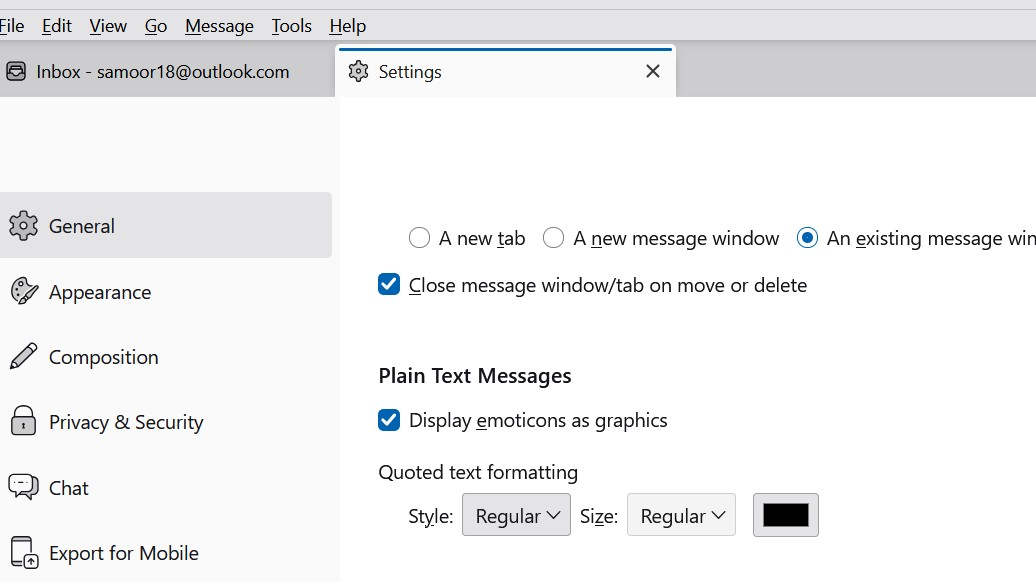
I use HTML as my signature. It has been working just find, but lately when people reply to me, their messages were coming in blue text. So today I changed the: Settings > General > Plain Text Messages > Quoted text formatting from blue colour to black (I have no idea how that was set to blue in the first place). that is all I did. Image attached of the change I made.
In any case, after that, when I tried to send a new email my HTML signature no longer displays the correct font (Pristina) but shows only variable text. The HTML file is not corrupt, it still looks fine in the actual file I saved, but, Thunderbird is changing it somehow. Even when I look back at sent files, Thunderbird is showing me the variable text and not Pristina.
Any assistance would be much appreciated. With thanks, NM
Toate răspunsurile (3)
I am unclear on the problem. You state that HTML was working but replies were blue, so you changed plain text to black. How does plain text fit with the HTML issue? And if you only changed a plaintext font color, that should not affect the HTML signature. Possibly , if you post the HTML source code of the sig, that may help. Posting HTML is problematic on the forum, so a screenshot of the HTML may be sufficient. thank you
Thank you David for your reply. Sorry for the confusion. I only mentioned changing the incoming text because that is what I did before I opened Thunderbird to find the signature was not displaying properly, I thought perhaps changing that might have caused the problem with my HTML signature not displaying as it should. (Thunderbird has done odd things before.)
That was the only change I made to Thunderbird before the Signature display changed.
I am attaching 3 images, first of how it should look and how it has always looked until yesterday, second is the source coding, and third - how it looks in Thunderbird as of yesterday.
NM

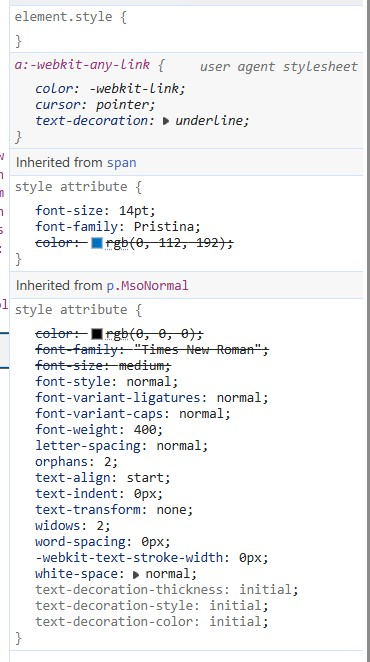

I am no HTML guru, but it appears to me that you are using more HTML in the sig than that. That is, it appears to be part of a larger HTML envelope. For example, I did a simple sig that did only what you show
<span style="font: arial; font-size 14pt; font-style: italic; ">If you forward this email, please remove my name and email address beforehand (thanks).</span><br/><br/> <a href="https://paintingartist.ca/" target="_blank" style="font-size: 14pt; font-family: pristina; text-decoration-line: underline; font-weight: 400; text-decoration-style: solid;">https://paintingartist.ca</a>
The colors don't match, but what I wrote stands alone, while the sig you use appears to be part of something else. How do you insert it into the sig? (And, maybe someone else will see this and have better advice.)