


Rezolvat
Duplicate folders cannot be deleted

I installed Thunderbird on my new laptop, then imported the profile from my old laptop
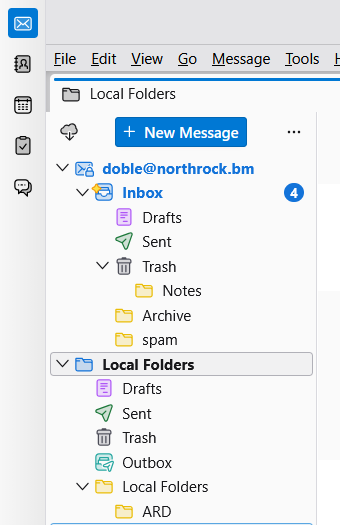
The main screen has, under "Inbox", folders for Drafts, Sent, Trash, Archive and Spam, which are being used by the program
Folders for Drafts, Sent and Trash also appear under "Local Folders" (along with Outbox) and these aren't being used by the program.
How do I get rid of these duplicate folders? "Spam" had a delete option, so that was easy, but the others don't.
I tried the two suggestions for a previous "Duplicates" question but they didn't resolve things.
Thank you
I installed Thunderbird on my new laptop, then imported the profile from my old laptop
The main screen has, under "Inbox", folders for Drafts, Sent, Trash, Archive and Spam, which are being used by the program
Folders for Drafts, Sent and Trash also appear under "Local Folders" (along with Outbox) and these aren't being used by the program.
How do I get rid of these duplicate folders? "Spam" had a delete option, so that was easy, but the others don't.
I tried the two suggestions for a previous "Duplicates" question but they didn't resolve things.
Thank you
Toate răspunsurile (1)
Soluție aleasă
If this problem did not exist on old computer, then you may want to redo this. I assume both computers run the same version of thunderbird.