


Windows 10 reached EOS (end of support) on October 14, 2025. If you are on Windows 10, see this article.

Caută ajutor

Atenție la excrocheriile de asistență. Noi nu îți vom cere niciodată să suni sau să trimiți vreun SMS la vreun număr de telefon sau să dai informații personale. Te rugăm să raportezi activitățile suspecte folosind opțiunea „Raportează un abuz”.

Află mai multe
Deschide

i build an automation tool by using your firefox dev addition but recently i am seeing this agree to terms popup i wanna know how can i stop that or agree to that with fags like start firefox with fags which disable or auto agree to that

Vibeshiftbots

Hello,

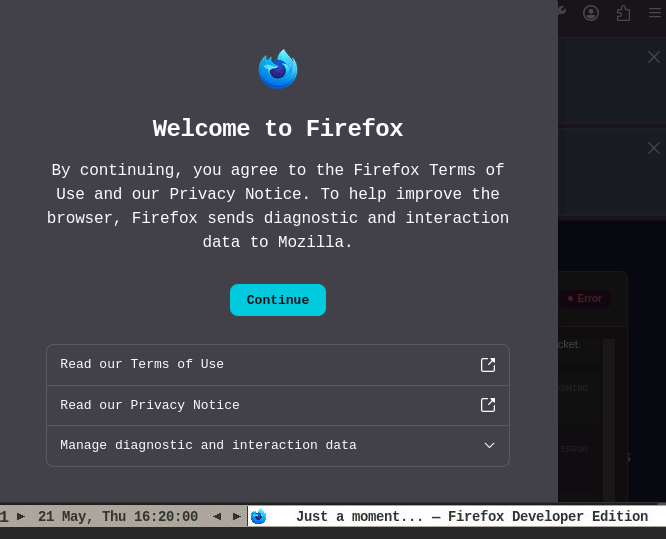
I am building a browser automation tool using Firefox Developer Edition. Recently, I started running into an issue where an "Agree to Terms" (or Privacy/Welcome) popup appears when the browser launches.

Because this is an automated environment, this popup blocks my scripts from running properly because human interaction is required to click past it.

My Setup:

Browser: Firefox Developer Edition (latest version)

Use case: Automated testing/scripting

What I am trying to achieve: I need to know how to stop this popup from appearing entirely, or how to automatically agree to it. Are there specific command-line flags (similar to Chrome's startup flags) or about:config profile preferences I can inject when launching the browser to bypass this?

I have attached a screenshot of the exact popup I am seeing.

Any advice on the exact flags or preferences needed to silence this for automation would be greatly appreciated. Thank you!
Hello, I am building a browser automation tool using Firefox Developer Edition. Recently, I started running into an issue where an "Agree to Terms" (or Privacy/Welcome) popup appears when the browser launches. Because this is an automated environment, this popup blocks my scripts from running properly because human interaction is required to click past it. My Setup: Browser: Firefox Developer Edition (latest version) Use case: Automated testing/scripting What I am trying to achieve: I need to know how to stop this popup from appearing entirely, or how to automatically agree to it. Are there specific command-line flags (similar to Chrome's startup flags) or about:config profile preferences I can inject when launching the browser to bypass this? I have attached a screenshot of the exact popup I am seeing. Any advice on the exact flags or preferences needed to silence this for automation would be greatly appreciated. Thank you!
Capturi de ecran atașate

Toate răspunsurile (1)

You have to set up the SkipTermsOfUse policy.

Adresează o întrebare

Trebuie să intri în cont ca să răspunzi la o postare. Te rugăm să adresezi o întrebare nouă dacă nu ai încă un cont.