


What is abook.v2.sqlite?
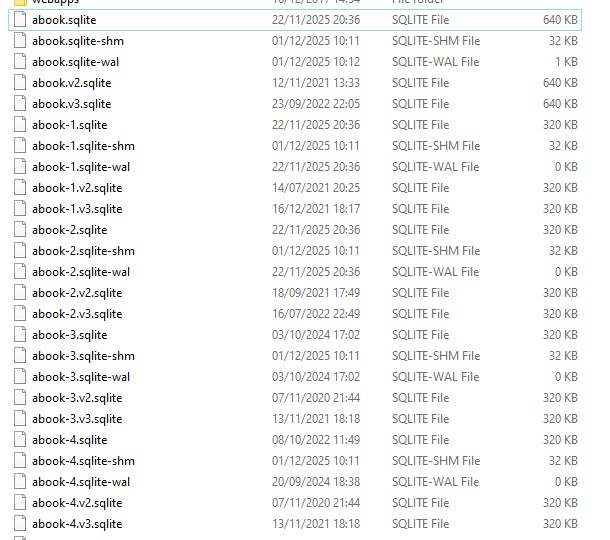
I have been using Thunderbird for 20+ years and am on the latest version, but trying to eliminate what I believe to be old files from legacy versions that have been left behind. I don't want to delete anything and break Thunderbird, but wondered if these files were redundant:
abook.v2.sqlite + abook.v3.sqlite
These haven't changed since 2021 & 2022 apparently.
Also, I have a lot of address books (I find using addresses in a given address book excellent for email filters). Are abook-1.sqlite, abook-2.sqlite etc my individual address books?
If so, how can I tell which file belongs to which address book?
I also have v2 and v3 files (eg: abook-1.v2.sqlite) for most of these.
Hopefully this makes sense. Thanks in advance for any help.
Toate răspunsurile (2)
Soluție aleasă
I am NOT the super tekkie on this forum. BUT, I experiment and survive. :) The important addressbooks are abook.sqlite and history.sqlite. From my experience, you can delete all the others (when thunderbird is not running) and the appropriate ones will be recreated when you restart thunderbird. That's been my experience and I just did it prior to writing this response. Also, if you still have abook.mab or history.mab, they are old and can be deleted
Thanks David. I was thinking along the same lines, just didn't want to risk corrupting Thunderbird by blindly going ahead, just in case. I do have daily backups, but it's a lot less stressful if you can be fairly certain what you are doing is not going to cause problems. Appreciate the helpful reply.