


How to troubleshoot EWS self-hosted connections?

So I have a self hosted Exchange and I have no problems using it from apps like Google Mail, Outlook and such, plus I can login directly to its .../EWS/Exchange.asmx through a browser. However, when trying with Thunderbird 145/Linux, I always get that username or password are incorrect, but it doesn't tell me exactly what went wrong and how it tried, so I'm in the dark why it is happening. Note: exchange's url is on a different domain than my account.
Basically it's either this message: Authentication error.
Component returned failure code: 0x80004005 (NS_ERROR_FAILURE) [nsIMsgAccountManager.createIncomingServer]
Or similar if I try to get message from inbox.
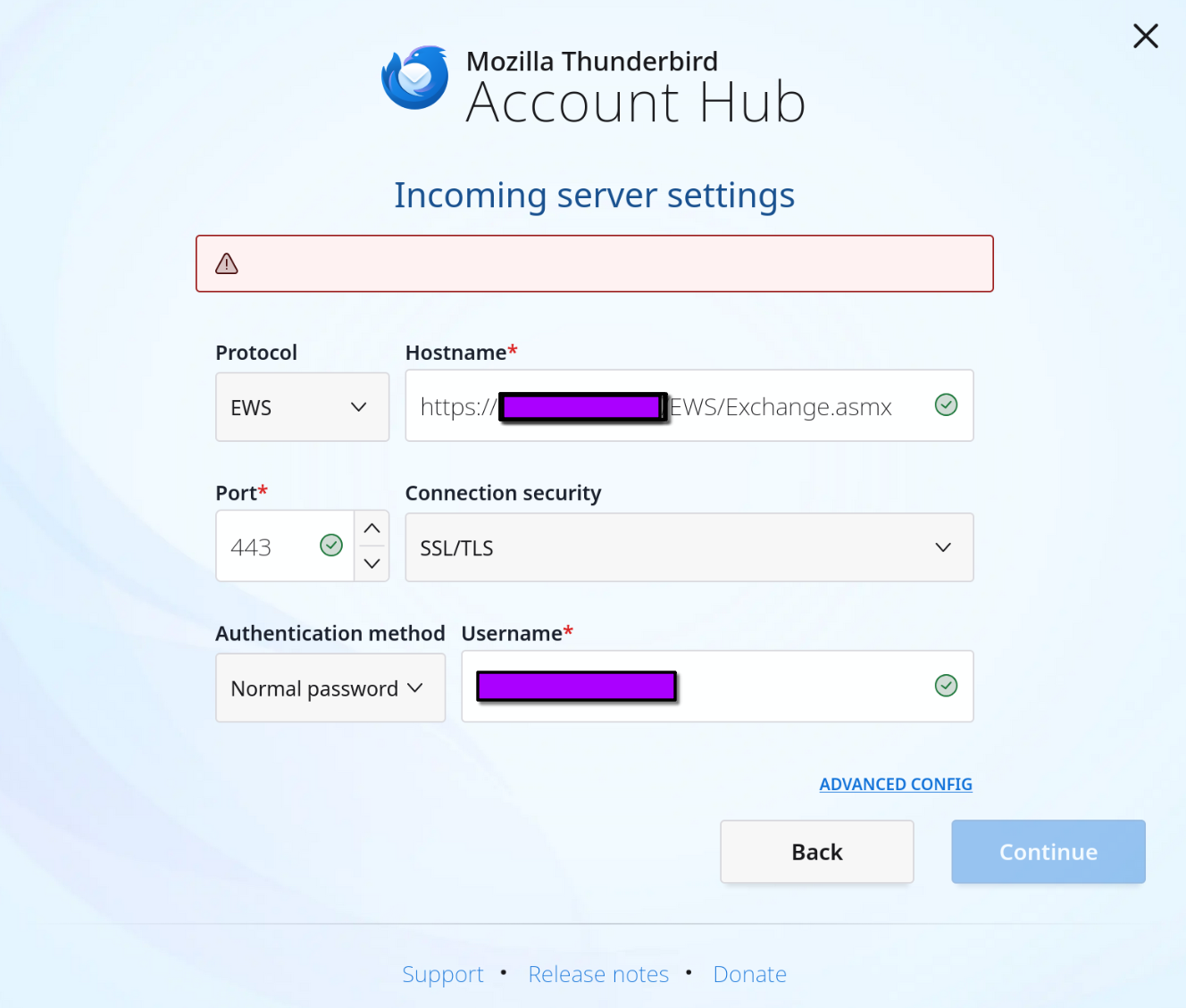
Also weird things happen during configuration, like attached image (note that I've tried different URL permutations)
TLDR; how do I diagnose the issue, or ever better, how to connect? TIA
Modificat la de Wayne Mery
Soluție aleasă
Hi Brendan,
First, thanks for verbose answer. After investigating around (also with my e-mail admin), I think the problem is that the apparently server offers only NTLM authentication (which TB doesn't support (yet?)) but not Basic - at least that seems from the logs. I've asked him to enable basic authentication and hopefully that will do the trick. Either way I'll post more info here, TIA.
Citește răspunsul în context 👍 0Toate răspunsurile (6)
In case anybody wonders, my problems are most probably linked to Exchange being self hosted.
Miha Markič said
In case anybody wonders, my problems are most probably linked to Exchange being self hosted.
Does anything at https://wiki.mozilla.org/Thunderbird:Exchange#Self_hosted_scenario_-_less_common match to your situation?
Hi Wayne and thanks again. I'll just copy here (for the sake of history and whether it helps somebody) what I've discovered using development tools.
I see them, it ends at successful GET request to https://DOMAIN/owa/auth/logon.aspx?url=https://DOMAIN/owa/&reason=0 Response is the aspx login page Why would it load an aspx page in first place? Looking at it, it starts with POST to https://DOMAIN and reponse is redirected (302) to https://DOMAIN/owa and once more to https://DOMAIN/owa/auth/logon.aspx?url=https://DOMAIN/owa/&reason=0 I assume these 302s make it go bonkers - can somebody tell me what exactly should happen after first request (POST to https://DOMAIN) in a valid scenario - so I can relay the info to the admin (in meantime I've asked admin to disable 302 on POST https://DOMAIN)
So I'm a bit lost on how exactly is this scenario even supposed to work? Account Settings/Server Settings/Server Name allows me to enter only the hostname (otherwise I'd try with /ews suffix) but when fetching data thunderbird tries posting to HOSTNAME, not HOSTNAME/ews.
Modificat la de Miha Markič
Hey there 👋
Miha Markič said
I assume these 302s make it go bonkers - can somebody tell me what exactly should happen after first request (POST to https://DOMAIN) in a valid scenario - so I can relay the info to the admin (in meantime I've asked admin to disable 302 on POST https://DOMAIN)
I agree with you, something seems wrong with this 302. I'd suspect there's a configuration issue on one end - either the server side of things isn't properly configured to accept EWS requests, or the EWS URL ("Hostname") is incorrect. This seems like a domain-specific issue to me, so asking your admin for assistance sounds like the right next step to me.
Miha Markič said
So I'm a bit lost on how exactly is this scenario even supposed to work? Account Settings/Server Settings/Server Name allows me to enter only the hostname (otherwise I'd try with /ews suffix) but when fetching data thunderbird tries posting to HOSTNAME, not HOSTNAME/ews.
Changing the Server Name in the account settings (once an account has been created, or after clicking on "Advanced Config") doesn't actually do anything useful. We have work lined up to fix this slight inconsistency (we caught it a bit late) but it hasn't been done yet. If you want to change the EWS URL, i.e the URL used to perform requests, you can do this by clicking on the "Advanced" button in the same Server Settings page.
Regarding the account configuration through the account hub (the screenshot you shared), it's been a while since I last looked into this, but if my memory serves me right, clicking the "Continue" button should trigger a connectivity check. For EWS, this means a POST request to the EWS URL ("Hostname") to verify that we can properly connect to the server and retrieve email data with the current settings. If this resulted in a 302 to the Outlook web app (which seems to be happening here), it would explain why the configuration tool is unable to perform this check.
Soluție aleasă
Hi Brendan,
First, thanks for verbose answer. After investigating around (also with my e-mail admin), I think the problem is that the apparently server offers only NTLM authentication (which TB doesn't support (yet?)) but not Basic - at least that seems from the logs. I've asked him to enable basic authentication and hopefully that will do the trick. Either way I'll post more info here, TIA.
Ah gotcha, the mystery is solved then! NTLM is indeed not supported for EWS accounts yet but we're actively working on it, it should be added to Thunderbird in the coming months 🙂
Modificat la de Brendan Abolivier