


Windows 10 reached EOS (end of support) on October 14, 2025. If you are on Windows 10, see this article.

Caută ajutor

Atenție la excrocheriile de asistență. Noi nu îți vom cere niciodată să suni sau să trimiți vreun SMS la vreun număr de telefon sau să dai informații personale. Te rugăm să raportezi activitățile suspecte folosind opțiunea „Raportează un abuz”.

Află mai multe

How do I change printers?

  • 3 răspunsuri
  • 4 au această problemă
  • 189 de vizualizări
  • Ultimul răspuns dat de Martin Connor

How do I change printer?

How do I change printer?

Toate răspunsurile (3)

See this image. A list of your printers is in the Destination drop-down.
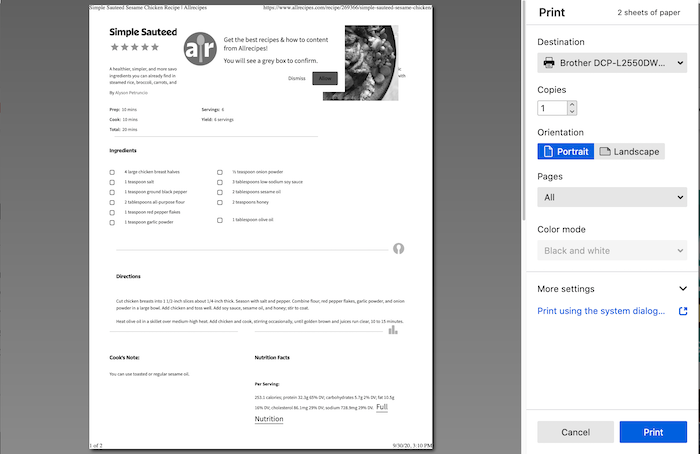
Fx82PrintUI

s.cure said

How do I change printer?

Just go to your Mac’s System Settings → Printers & Scanners, hit the “+” button to add your new printer, then select it as the default. You can remove the old one if you want.

s.cure said

How do I change printer?

Just click the Destination drop-down at the top of the print window and select a different printer from the list. If you don’t see the one you want, make sure it’s installed on your computer first. 👍