


Firefox Download Save & Retrieve Folders

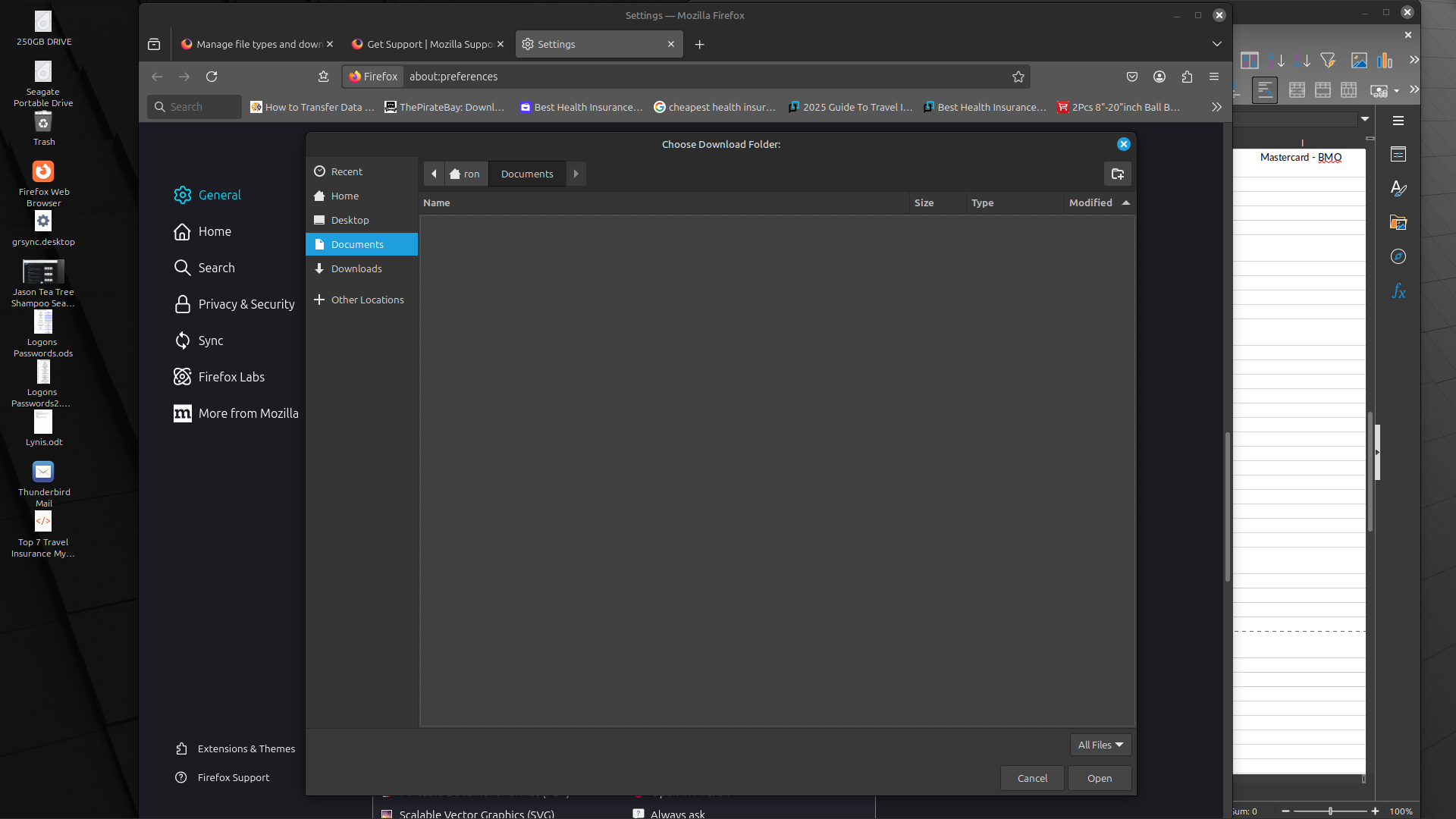
The Firefox 'Downloads, Save Files To.." location appears to be disconnected from reality. If I indicate either of the Documents or Desktop folders as the preferred save location, both of those folders present as being empty when in fact they both have numerous files/directories. Even if I try to save in "+ Other Locations", those locations are limited to the same as presented in the 'Browse' window of Home, Desktop, Documents and Downloads. Only the Downloads folder displays correctly.
Also as a result of this limited save location, I can only retrieve a file from the Downloads folder (the attached file was saved in my Documents folder but I had to move it to Downloads.
Why does the saving behavior behave like this?
Toate răspunsurile (2)
This could be caused by the way your Firefox is packaged having restricted access to the file system.
My system is Linux Mint 22 Cinnamon. The restricted access would certainly appear to be the case since browsing to a new (other) location only leads back to the same 'Home' folders (Desktop, Documents and Downloads). Why the downloads folder is the only one to accurately display its contents is curious though as all three possess the same permissions & not sharing attributes.