Weather on New Tab Page Shows Wrong Location

My new tab page shows a weather forecast, but it's for Kansas City instead of where I live.
How do I change the forecast to show my current location?
Soluție aleasă
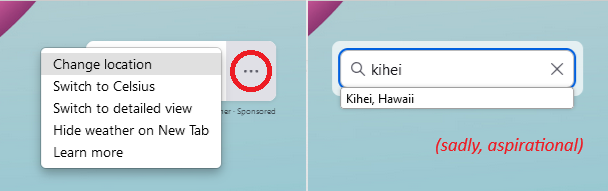
"Change location" might be disabled/hidden in the three-dot Weather menu, you may need to enable this via about:config.
- about:config => browser.newtabpage.activity-stream.weather.locationSearchEnabled => true
- https://support.mozilla.org/en-US/kb/customize-items-on-firefox-new-tab-page
Citește răspunsul în context 👍 3
Toate răspunsurile (9)
Soluție aleasă
"Change location" might be disabled/hidden in the three-dot Weather menu, you may need to enable this via about:config.
- about:config => browser.newtabpage.activity-stream.weather.locationSearchEnabled => true
- https://support.mozilla.org/en-US/kb/customize-items-on-firefox-new-tab-page
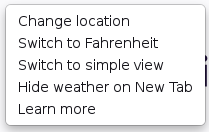
That solution worked, but it raises another question:
Why was that feature disabled in the first place? I certainly didn't disable it–I didn't even know it existed.

I had to re-install firefox and this new widget showed up. I like it :) I also did not have "change location" which I found reference to while searching this issue but I do now. Yes, why was it disabled in first place?

Hello--
In about:config, mine was already set to 'true', but I still cannot change the location, which is off by roughly 15 miles. Suggestions?
Do you see the menu I posted above if you click the three-dots in the weather gadget? Can AccuWeather show data about your exact location if you visit its website directly via the address bar as it is possible that your location isn't available and the website switches to a larger city nearby?
This is set to "true". I still cannot change the location! I can access the location easily on the web page, but it will not change it on Firefox home page, and does nothing when I access the change location menu item! I tried city and state, and zip code. It does not work!

Can't change location. Tried it in the new tabpage weather dropdown menu and from
"about:config browser.newtabpage.activity-stream.weather.query" by entering my zipcode into the blank field.
No luck. The actual displayed zip code is roughly 8 miles from my zip code. Both are zip codes that work in accuweather, so this a Firefox issue, not an accuweather issue. Not going to bother uninstalling and reinstalling Firefox. I'll live with it.
Modificat la de stevem1091
stevem1091 said
entering my zipcode into the blank field.
Zip codes doesn't work there, you need to input the city name.
Mine seems to do a background lookup as I type the city name on the new tab. Some of the cities I tried didn't come up with any matches. I guess those are not supported and I'd need to choose a larger city nearby?