


Moving emails from imported .mbox file in Local Folder to Gmail account in Thunderbird

Hi there,
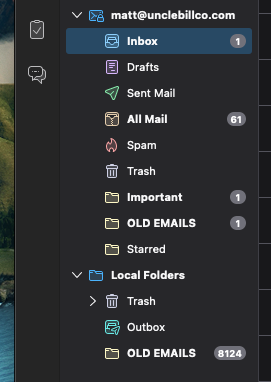
I am trying to import emails from my old gmail account to a new account. I successfully imported the .mbox file with my old emails into Thunderbird and the emails are showing up under the "Local Folders" but when I drag that folder into my new Gmail account it is only copying over 1 out of 8124 emails.
Why is it not copying over all of the emails?
Thank you!

Toate răspunsurile (3)
Copying to IMAP is problematic, not because of Thunderbird, but it's part of the IMAP architecture. If you need to do that, I suggest copying a few messages at a time. How many you can do may vary.
Thanks for replying but I was hoping for a little more in-depth of a answer/solution as to why it is only copying over one of the emails when I drag the entire folder into my inbox.
I watched this video and it seems as easy as drag and drop. Like I said, it is copying emails over but just 1 email is copying.
https://www.youtube.com/watch?v=k9KpS4e1voc
Are you a Thunderbird Support tech or just a Mozilla community member?
thank you