


Windows 10 reached EOS (end of support) on October 14, 2025. If you are on Windows 10, see this article.

Caută ajutor

Atenție la excrocheriile de asistență. Noi nu îți vom cere niciodată să suni sau să trimiți vreun SMS la vreun număr de telefon sau să dai informații personale. Te rugăm să raportezi activitățile suspecte folosind opțiunea „Raportează un abuz”.

Află mai multe

Update to Thunderbird 115.3.3 duplicated folders

  • 2 răspunsuri
  • 0 au această problemă
  • 288 de vizualizări
  • Ultimul răspuns dat de pete48
  • Rezolvată

I recently updated Thunderbird to 115.3.3. When the update was complete it appears to have split my profile into two and created two of Inbox, Drafts, Sent, and Trash. I use Earthlink which is the name of the POP3 account. Now there are Inbox, Drafts, Sent, and Trash for "Earthlink", and a set for "Local Folders". Junk and Archives are only associated with "Local Folders", and "Outbox" shows up under a "Local Folders" header along with all of the folders I used to organize received messages. When new messages are downloaded they appear in "Inbox / Local Folders". Nothing appears in any of the "Earthlink / ..." folders.

I don't recall exactly what it looked like before but there was only one set of the primary folders, and the local folders I created to organize my inbox. I have attached screenshots of the the folder navigation pane, as well as the odd organization of the "Account Settings" tab. I am admittedly not an expert. Any help is appreciated.
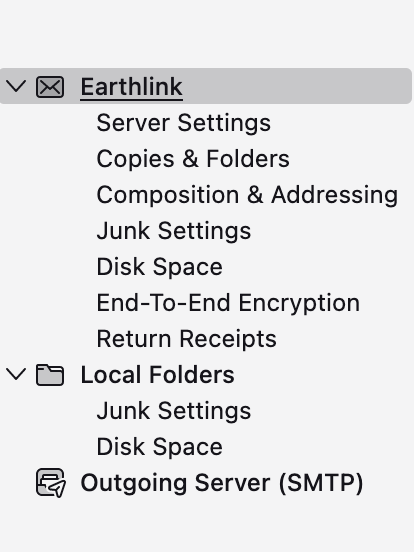
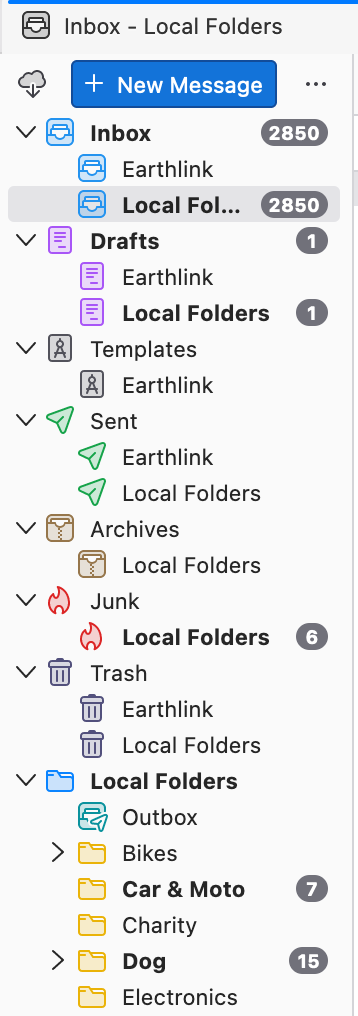
I recently updated Thunderbird to 115.3.3. When the update was complete it appears to have split my profile into two and created two of Inbox, Drafts, Sent, and Trash. I use Earthlink which is the name of the POP3 account. Now there are Inbox, Drafts, Sent, and Trash for "Earthlink", and a set for "Local Folders". Junk and Archives are only associated with "Local Folders", and "Outbox" shows up under a "Local Folders" header along with all of the folders I used to organize received messages. When new messages are downloaded they appear in "Inbox / Local Folders". Nothing appears in any of the "Earthlink / ..." folders. I don't recall exactly what it looked like before but there was only one set of the primary folders, and the local folders I created to organize my inbox. I have attached screenshots of the the folder navigation pane, as well as the odd organization of the "Account Settings" tab. I am admittedly not an expert. Any help is appreciated.
Capturi de ecran atașate

Modificat la de Wayne Mery

Soluție aleasă

Do View > Folders > All Folders. Then disable View > Folders > Unified Folders

Citește răspunsul în context 👍 1

Toate răspunsurile (2)

Soluție aleasă

Do View > Folders > All Folders. Then disable View > Folders > Unified Folders

That was it. Guess it was a simple configuration change during the update. Thanks very much.