


Unable to write the email

Consistent error message:
"Unable to write the email to the mailbox. Make sure the file system allows you write privileges, and you have enough disk space to copy the mailbox."
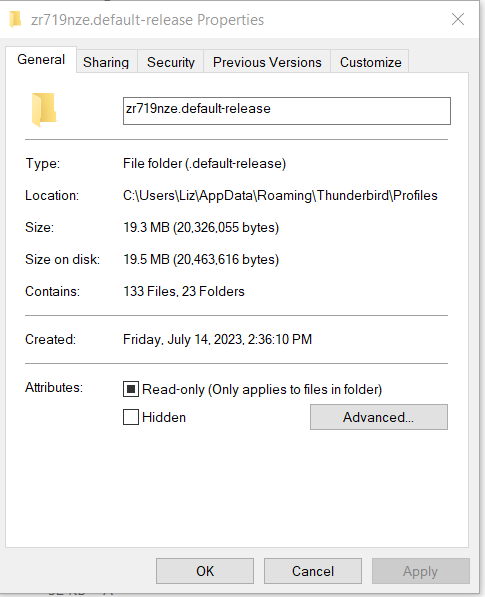
I did a complete removal (Revo Uninstaller) and re-install and the problem persists. Today is 07/14/23 and the latest message downloaded is 07/11/23. I can download the current messages on another PC so it's not a server problem. I have reviewed the attributes of the mail folder and it is not "R" but when I try to use File Explorer to change them, it says that it's locked as "R"
Toate răspunsurile (2)
Have you tried removing your anti virus and seeing if the issue persists. My experience is that when there is a disk space shortage, it is either real (as in the drive is basically full) or there is an antivirus, streaming backup or some sort of syncing going on that has the relevant file locked at the time of the write.
BTW the mention of Revo makes me shudder. Generally those that have it and have already used it have only made the situation much worse than it was to start with. Uninstalling is not a way to fix Thunderbird. Using Revo is a good way to loos you existing data however. I find it also appear to appear with CCleaner, one of the most destructive mainstream packages you can install on a system with Thunderbird.

Hi,
I encountered the same problem using 102.13.0. I have used Tbird for years on this system. I thought to upgrade to SuperNova but the problem persisted. Slightly more detail - 5 new mail items were read from the server, then I got the "Unable to write..." dialog box. If I requested "Get messages", the same 5 mail items were retrieved. I read that a very full server inbox could cause problems so I cleared the inbox on the server. I wrote emails to my address and they are now retrieved without issue.
I found this article pointed to my solution: https://kb.mozillazine.org/Keep_it_working_-_Thunderbird
Hope this helps.
Regards