


How to download folders from AT&T websites mail

I have used AT&T Websites Mail for years for my domain, but that's all going away at the end of the month. To recover and preserve my emails I've installed Thunderbird as pop server to store all emails on my local desktop. My inbox was accessed and downloaded successfully, however, over the years I have sorted much of the mail I have received into topic specific folders. Thunderbird did not access or download those folders onto my desktop. on my desktop and while it successfully connected with my email account and downloaded all contents of my inbox none of the category folders, nor did it bring over Sent or Draft folders. I've gone through the settings but don't see anything obvious. What am I doing wrong?
Soluție aleasă
Right-click the account in the Folder Pane, Subscribe..., and check the required folders. The sent messages might be in a folder named Sent Mail, Sent Items, depending on the server's convention.
Citește răspunsul în context 👍 1Toate răspunsurile (4)
POP accounts only download the Inbox. To download other folders, the account must be set up as IMAP.
https://support.mozilla.org/en-US/kb/switch-pop-imap-account
https://www.att.com/support/article/dsl-high-speed/KM1010523/
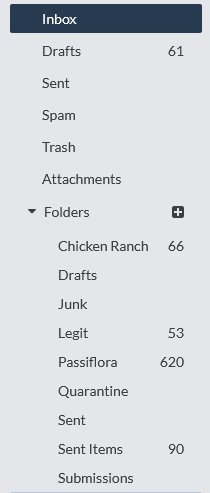
Thanks for the suggestion, sfhowes, but switching from POP to IMAP has only given me empty Sent and Draft on my desktop and none of the "sorted" folders that I'm trying to access from the server interface (as viewable in the screengrab). Any new suggestions, or must I resort to forwarding those saved messages individually?
Soluție aleasă
Right-click the account in the Folder Pane, Subscribe..., and check the required folders. The sent messages might be in a folder named Sent Mail, Sent Items, depending on the server's convention.
BINGO! That did the trick. Thank you, sfhowes!