


Windows 11, Firefox v 100.0, Change Scrollbar Width

I went into about:config and changed the following values in order to widen the scrollbar:
css. scrollbar-width was true changed to false idget.non-native-theme.scrollbar.size.override was 0 changed to 100 widget.non-native-theme.enabled was true changed to false
Changing these values didn't widen my scrollbar. Without getting into coding, is there another way to make the scrollbar wider? (I changed them all back to the original settings when they didn't work.)
Soluție aleasă
See also the release notes.
Scrollbars on Linux and Windows 11 won't take space by default. On Linux, users can change this in Settings. On Windows, Firefox follows the system setting (System Settings > Accessibility > Visual Effects > Always show scrollbars).
Toate răspunsurile (6)
Maybe look at widget.non-native-theme prefs like these on the about:config page.
- widget.non-native-theme.win.scrollbar.use-system-size
- widget.non-native-theme.win11.scrollbar.force-overlay-style
This is a screenshot of my scrollbar on the right. It's probably only about 1/16" wide.

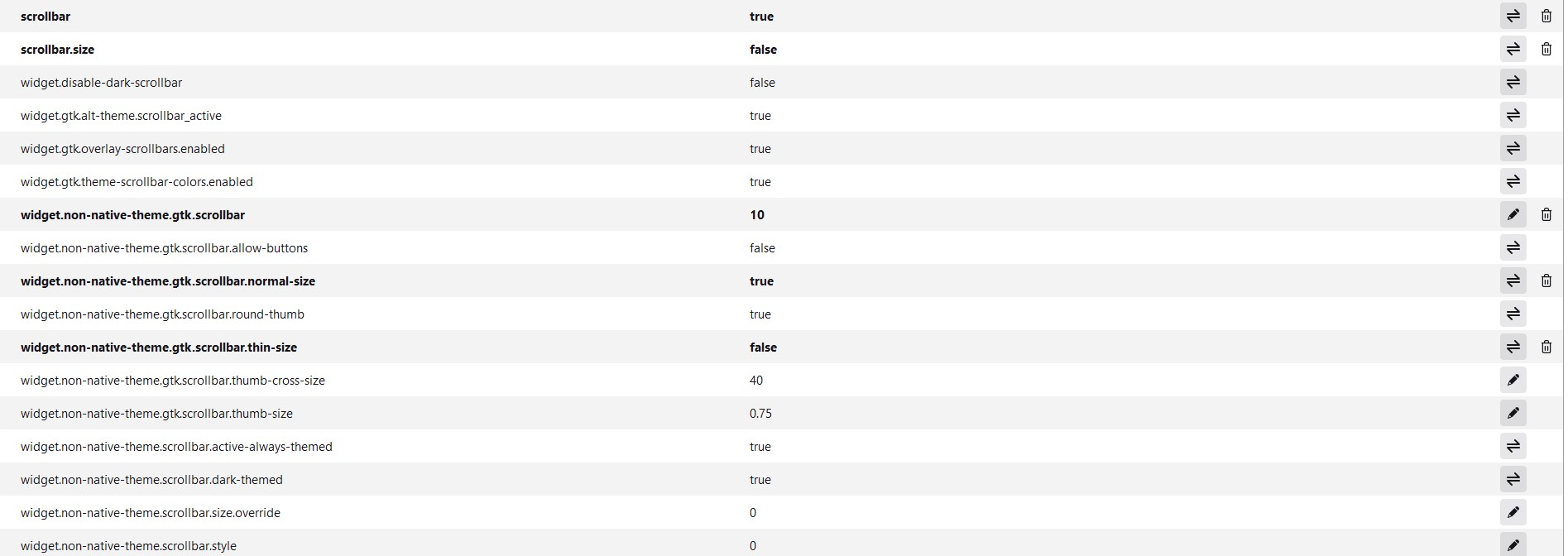
This is a screenshot of about:config, scrollbar.
Soluție aleasă
See also the release notes.
Scrollbars on Linux and Windows 11 won't take space by default. On Linux, users can change this in Settings. On Windows, Firefox follows the system setting (System Settings > Accessibility > Visual Effects > Always show scrollbars).
That did the trick. Thanks very much!
Modificat la de Denise

If the 'override' preference doesn't work, try changing the preference at the bottom of your second screenshot. The number 4 will evidently give you a wider scrollbar. You may be able to change the override preference with a different style.
The style of scrollbars to use. Here are the current options: widget.non-native-theme.scrollbar.style 0: Default platform scrollbar style. 1: macOS scrollbars 2: GTK scrollbars 3: Android scrollbars 4: Windows 10 scrollbars 5: Windows 11 scrollbars