


Firefox 98.0 automatically downloads every attachment

Hello Mozilla Support!
I just installed Firefox 98.0 this morning. I was very surprised to discover that I can no longer view an attachment in Firefox or open an attachment without also downloading it.
If you can, please ask the developers to reinstate the Download Attachment options to "Open with Firefox" and "Open with [select the program]" without automatically downloading every attachment.
Thank you!
-Steve
Steve Friedman
Soluție aleasă
Firefox download behavior has changed. See How file downloads are handled in Firefox for more information.
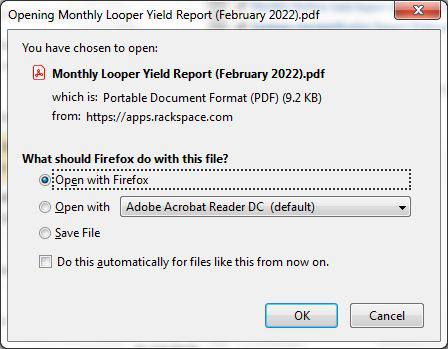
When you select "Always ask" for a type of file in your Firefox Application settings, you can still get the "What should Firefox do with this file?" prompt. However, even though you choose to open a file, Firefox will also save the file to your Downloads folder. In previous versions, when you opened a file in an application, it was still saved to the Windows Temp folder, even though you didn't realize it.
The people who answer questions here, for the most part, are other users volunteering their time (like me), not Mozilla employees or Firefox developers. If you want to leave feedback for Firefox developers, you can go to the Firefox Help menu and select Submit Feedback... or use this link. Your feedback gets collected by a team of people who read it and gather data about the most common issues.
Citește răspunsul în context 👍 0Toate răspunsurile (2)

Soluție aleasă
Firefox download behavior has changed. See How file downloads are handled in Firefox for more information.
When you select "Always ask" for a type of file in your Firefox Application settings, you can still get the "What should Firefox do with this file?" prompt. However, even though you choose to open a file, Firefox will also save the file to your Downloads folder. In previous versions, when you opened a file in an application, it was still saved to the Windows Temp folder, even though you didn't realize it.
The people who answer questions here, for the most part, are other users volunteering their time (like me), not Mozilla employees or Firefox developers. If you want to leave feedback for Firefox developers, you can go to the Firefox Help menu and select Submit Feedback... or use this link. Your feedback gets collected by a team of people who read it and gather data about the most common issues.
Thank you very much, Alice! I really appreciate you and other people volunteering your time to answer questions here.
I forgot that in previous versions when I opened a file in an application, it was still saved to the Windows Temp folder. I shared this information with other Firefox users at our plant who asked me about the recent changes in Firefox 98.0.
Thanks again!
-Steve