


Exit browser warning disappeared

Hello,
I have noticed over the past couple of months that if I accidentally click the big red x in the top-right corner of the Firefox browser, that all of my currently open tabs then close and disappear without any warning.
Firefox used to display a warning dialogue box stating "Warning - you are about to exit Firefox and xx amount of tabs will be closed. Are you sure you want to proceed?"
But recently this warning has been removed and multiple times now I have lost all of my tabs/online work after accidentally clicking the exit button.
Could you kindly re-instate this warning dialogue box because it was extremely useful?
Thanks very much for your help, Tony
Soluție aleasă
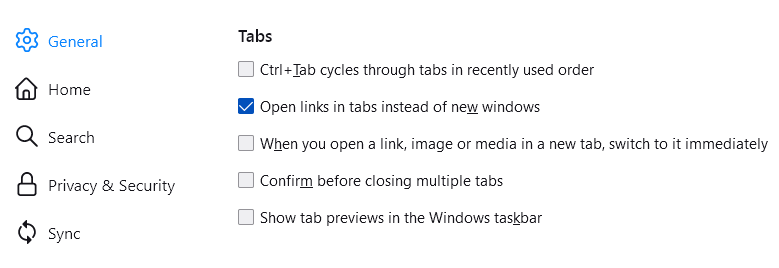
Note that you can control this via "Settings -> General -> Tabs: Confirm before closing multiple tabs".
Best is to use one of these to close Firefox if you are currently doing that by clicking the close X on the Firefox Title bar, especially if you have multiple windows open to prevent losing tabs in unnoticed windows (only the last closed window is restored).
- "3-bar" menu button -> Exit (Power button)
- Windows: File -> Exit
- Mac: Firefox -> Quit Firefox
- Linux: File -> Quit
Toate răspunsurile (9)

I think these are the right settings; Type about:config<enter> in the address box. If a warning screen comes up, press the I Accept the Risk button. At the top of the screen is a search bar.
browser.tabs.warnOnClose = True browser.tabs.closeWindowWithLastTab = False
Thanks Fred. I just changed my settings and tested it and the warning appears again. Cheers.
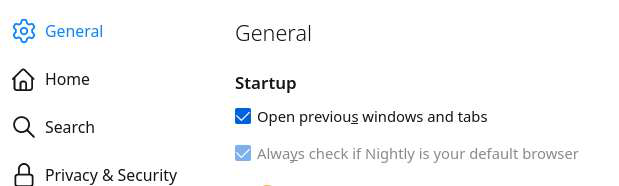
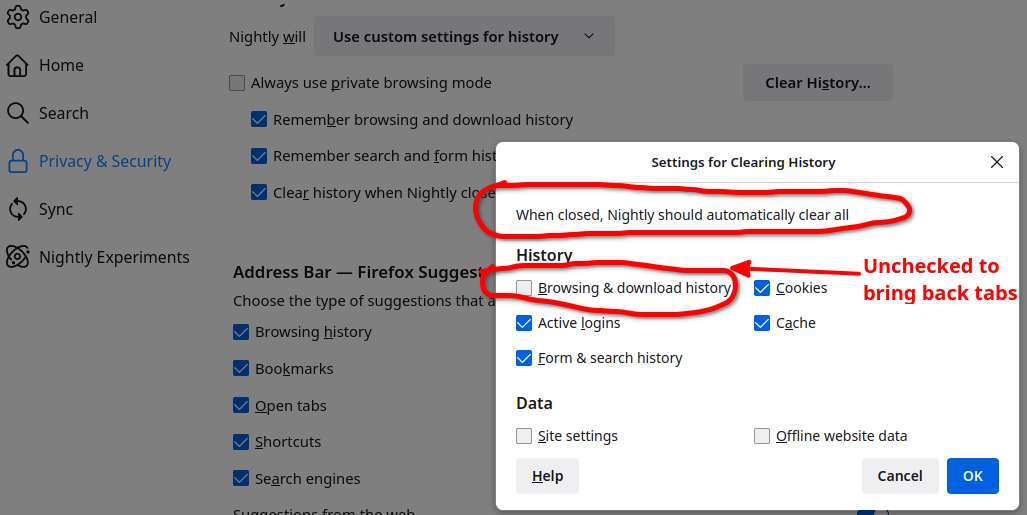
I would also check your settings so that if you close the browser, your session should return when you open it.
Glad to help. Safe Surfing.
Hello,
I am glad to hear that your problem has been resolved. If you haven't already, please select the answer that solves the problem. This will help other users with similar problems find the solution.
Thank you for contacting Mozilla Support.
Soluție aleasă
Note that you can control this via "Settings -> General -> Tabs: Confirm before closing multiple tabs".
Best is to use one of these to close Firefox if you are currently doing that by clicking the close X on the Firefox Title bar, especially if you have multiple windows open to prevent losing tabs in unnoticed windows (only the last closed window is restored).
- "3-bar" menu button -> Exit (Power button)
- Windows: File -> Exit
- Mac: Firefox -> Quit Firefox
- Linux: File -> Quit

WARNING: Changing preferences through about:config not officially supported Hidden settings edited using the about:config tool are explicitly not supported, which means that Mozilla makes no guarantees they will be supported in the future, or that Mozilla will fix them if they break. Mozilla does not test these preferences. That includes security and performance testing which these preferences may affect.
Tony, please use the instructions provided by jonzn4SUSE

This was a change that took place in Firefox version 94. If you want to see a warning when closing a window with multiple tabs, there is no need to use about:config - you can change your Firefox settings as follows:
Go to the Firefox menu  , click on Settings and, in the General panel Tabs section, select the option, Confirm before closing multiple tabs.
See Tab preferences and settings and How to configure Close Tab warnings in Firefox for details.
Thanks for your help everyone. I have now used the settings option to select the multiple tabs closure warning. Cheers.